
The Incident: Why Your Lead Routing Workflow Stops
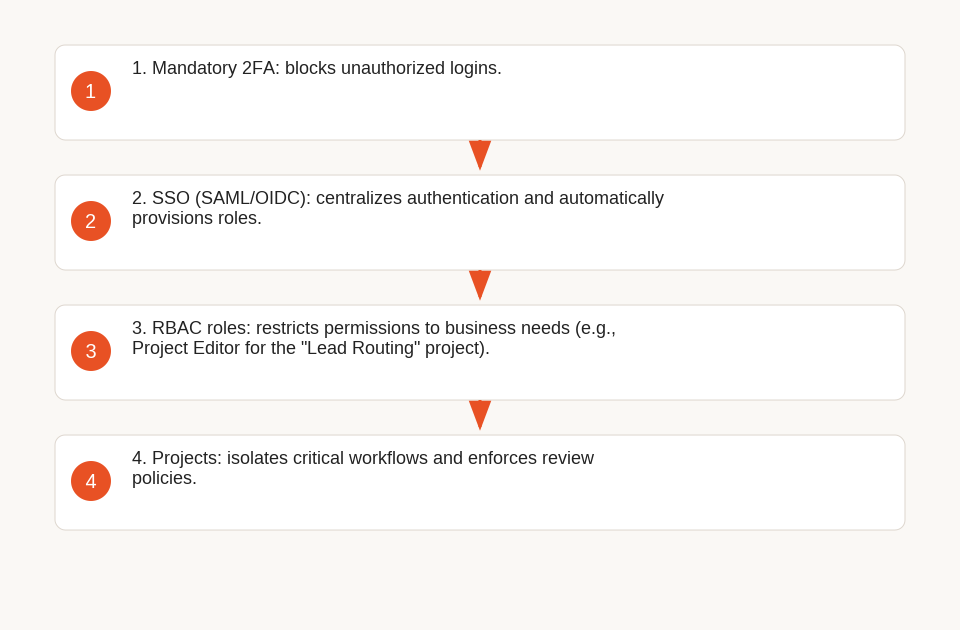
A common scenario: an employee leaves the company, their n8n account remains active, and a weak or shared password allows an unauthorized person to log in. The result? A critical workflow like lead routing is accidentally modified or disabled. Official n8n documentation confirms these incidents can be prevented with three layers of control:
- Enhanced authentication (mandatory 2FA),
- Centralized access (SSO with automatic role provisioning),
- Granular permissions (RBAC roles and project isolation).
1. Enable 2FA for All Users
2FA blocks 99.9% of brute-force attacks or password theft (F1). In n8n, enable it in two steps:
- Go to Settings > Policies and toggle Enforce two-factor authentication. All users will need to set up 2FA at their next login (F1).
- Each user generates recovery codes in Personal settings > Enable 2FA (using an app like Google Authenticator) (F2).
Limitation: 2FA doesn’t protect against active sessions left open. For sensitive workflows, combine it with short session durations (configurable via the IdP in SSO).
2. Centralize Authentication with SSO (SAML/OIDC)
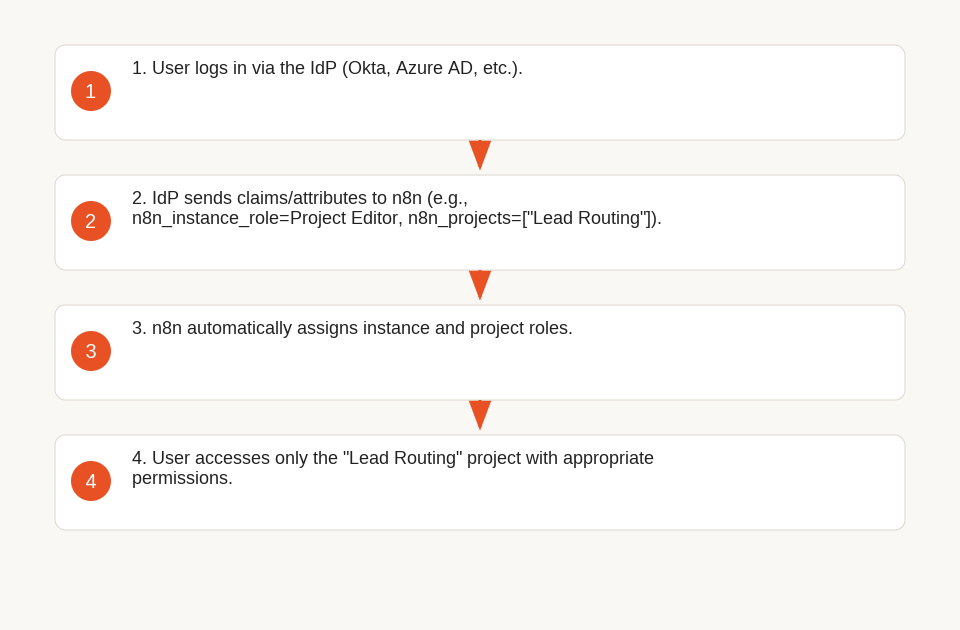
SSO eliminates local passwords and enables automatic role provisioning. n8n supports SAML and OIDC (F3):
- For OIDC: Configure the Discovery Endpoint, Client ID, and Client Secret from your IdP (Okta, Azure AD, etc.) in Settings > Authentication > Single sign-on (SSO). Enable role provisioning via claims like
n8n_instance_roleandn8n_projects(F4). - For SAML: Upload the IdP metadata (via URL or XML) and map user attributes (email, first name, last name). Roles are provisioned via attributes like
n8n_instance_role(F5).
Concrete example: With OIDC, a user in the « Sales Ops » group in Azure AD automatically receives the Project Editor role for the « Lead Routing » project at each login (F7).
Limitation: Automatic provisioning requires precise configuration on the IdP side. Always test with a test account before deploying to production.
3. Manage Permissions with RBAC Roles
n8n offers two levels of roles:
- Instance roles: Owner (full access), Admin (user management), Member (limited access), Chat user (read-only) (F6).
- Project roles: Project Admin (full management), Project Editor (workflow modification), Project Viewer (read-only) (F6).
To refine permissions, create custom roles:
- A « Lead Routing Manager » role can be limited to modifying workflows in the « Lead Routing » project, without access to other projects (F11).
- An « API Key Manager » role can be restricted to managing API keys, without access to workflows (F11).
Good to know: Roles are re-evaluated at each login in SSO, allowing instant access revocation from the IdP (F7).
4. Isolate Critical Workflows in Projects
Projects allow you to group workflows and credentials and apply specific permissions. For example:
- Create a « Lead Routing » project and assign the Project Editor role only to sales team members.
- Enable Workflow Reviews in Settings > Policies to require a review before any workflow publication (F9).
Limitation: Projects don’t isolate executions. A misconfigured workflow in one project can still impact shared resources (e.g., a database).
5. 10-Minute Validation Checklist
Verify each security layer with this checklist:
| Step | Action | Verification |
|---|---|---|
| 1. 2FA | Enable Enforce two-factor authentication in Settings > Policies. | All users have set up 2FA (check in Users). |
| 2. SSO | Configure SAML/OIDC and enable role provisioning. | A test account logs in and receives the correct roles automatically. |
| 3. Roles | Assign custom roles for critical workflows. | No user has an Admin or Owner role without justification. |
| 4. Projects | Isolate critical workflows in dedicated projects. | Only authorized members have access to the « Lead Routing » project. |
| 5. Review | Enable Workflow Reviews for sensitive projects. | A test workflow requires approval before publication. |
What n8n Doesn’t Do (and How to Compensate)
- High availability: n8n doesn’t offer automatic failover in case of server failure. For critical workflows, deploy n8n in a cluster (e.g., Kubernetes) or use external monitoring to restart the service automatically.
- Execution data redaction: This feature is reserved for Enterprise licenses (F10). For other editions, use environment variables to hide sensitive data (e.g.,
N8N_BASIC_AUTH_PASSWORD). - Audit of modifications: n8n doesn’t keep a detailed history of workflow changes. To compensate, regularly export workflows via the API or use a versioning tool like Git.
Resilient Workflow Template
Here’s an example of an n8n workflow for lead routing, designed to minimize risks:
- Step 1: Receive leads via a webhook (with data validation).
- Step 2: Check for idempotency (to avoid duplicates) (see our template).
- Step 3: Route to sales teams (with fallback in case of failure).
- Step 4: Slack/email notification in case of error.
Next steps: Check out our complete checklist for automating with n8n, including ready-to-use templates.