1. Key Requirements of Brazil’s 2026 SAC Decree for AI in Customer Service
Brazil’s Decree No. 13,135 (October 2026) applies to digital financial services regulated or supervised by the Central Bank of Brazil (F5). It regulates the use of AI to protect consumers, with technical constraints for providers:
- Mandatory human intervention: Consumers must be able to choose a human agent at any time via a permanently visible button (F1).
- Human service available 8 AM–8 PM every day: Maximum wait time of 20 seconds for a transfer to a human agent (F2).
- Simplified workflows: ≤ 3 levels deep, with limited transfers between channels (e.g., chat → phone) (F3).
- Full traceability: Retention of service histories and call recordings, accessible upon request by the consumer or authorities (F4).
Example: A password reset workflow must switch to a human if the customer clicks the dedicated button or if the AI detects an inconsistency (e.g., invalid account number), and record the entire interaction.
2. n8n Features to Comply with the SAC Decree
n8n is an open-source no-code platform that enables automated workflows with compliance-friendly features:
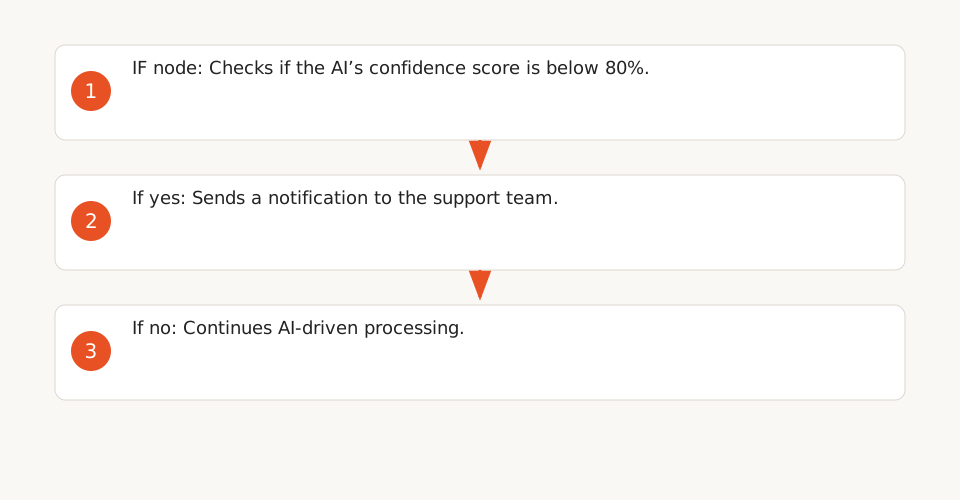
- Human fallbacks: n8n provides fallback mechanisms (F6, F7) via dedicated nodes. Example: If the AI cannot respond (confidence score < 80%), the workflow notifies the support team.
- Workflow traceability: Enable "Save Execution Data" to record node inputs/outputs (F9), with a redaction option for sensitive data. Add notes to nodes to document their role (F8), useful for audits.
- Concurrency limits: Configure `N8N_CONCURRENCY_PRODUCTION_LIMIT=20` to avoid overload and ensure complete logs (F10).
Note: n8n’s templates (F6, F7) are generic and must be adapted for SAC compliance. For example:
- Add a permanently visible "Talk to an advisor" button in the customer interface.
- Limit workflows to 3 levels maximum.
- Test human fallback scenarios to avoid penalties (e.g., wait time > 20 seconds).
3. Priority Workflows to Automate Under SAC Constraints
Here are the workflows best suited for automation, inspired by typical cases in the Brazilian banking sector:
| Workflow | Example | SAC Compliance |
|---|---|---|
| Password reset | Send a reset link via email after identity verification. | ✅ Mandatory human intervention ("Talk to an advisor" button). ✅ Traceability (step logs). |
| Balance inquiry | Retrieve balance via bank API and send via email/SMS. | ✅ ≤ 3 levels. ✅ Human fallback if balance is abnormal. |
| Routing complex requests | If AI cannot respond (e.g., complaint), transfer to a human. | ✅ Human service available 8 AM–8 PM every day. ✅ Wait time ≤ 20 seconds. |
3.1. Concrete Example: Balance Inquiry Workflow
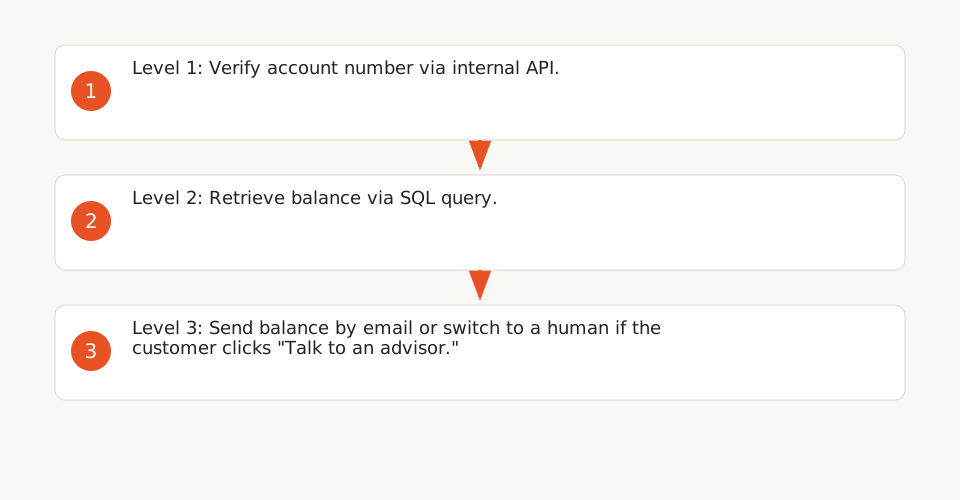
Structure the workflow in 3 levels to comply with the SAC Decree’s limit:
- Level 1: Customer identification (verify account number via internal API).
- Level 2: AI-driven request handling (retrieve balance via SQL query).
- Level 3: Send balance by email or switch to a human if the customer clicks "Talk to an advisor."
Example n8n configuration for the "Talk to an advisor" button:
{
  "nodes": [
    {
      "parameters": {
        "resource": "button",
        "operation": "create",
        "buttonText": "Talk to an advisor",
        "onClick": "triggerWorkflow"
      },
      "name": "Button - Talk to Advisor",
      "type": "n8n-nodes-base.webhook",
      "typeVersion": 1
    },
    {
      "parameters": {
        "toEmail": "support@bank.com",
        "subject": "Customer request requiring human intervention",
        "message": "{{$json["customer_request"]}}"
      },
      "name": "Send Email to Human Agent",
      "type": "n8n-nodes-base.emailSend",
      "typeVersion": 1
    }
  ]
}
3.2. Configuring Human Fallbacks in n8n
To ensure automatic human fallback, use an "IF" node to check the AI’s confidence score:
{
  "nodes": [
    {
      "parameters": {
        "conditions": {
          "boolean": [
            { "value1": "{{$json["ai_confidence"]}}", "operation": "<", "value2": 80 }
          ]
        }
      },
      "name": "IF AI Confidence < 80%",
      "type": "n8n-nodes-base.if",
      "typeVersion": 1
    },
    {
      "parameters": {
        "toEmail": "support@bank.com",
        "subject": "Human intervention required",
        "message": "Customer request: {{$json["customer_request"]}}"
      },
      "name": "Notify Human Agent",
      "type": "n8n-nodes-base.emailSend",
      "typeVersion": 1
    }
  ]
}
Recommendation: Ensure the "Talk to an advisor" button works in all cases, including if the AI detects an inconsistency (e.g., invalid account number).
4. Costs and Infrastructure: Self-Hosted vs. SaaS
The SAC Decree does not mandate specific technologies but requires functional outcomes (e.g., traceability, human intervention). Here’s a cost estimate for 50,000 executions/month:
| Solution | Monthly Cost (€) | Pros | Cons |
|---|---|---|---|
| n8n self-hosted (NVIDIA DGX Spark) | ~€1,200 (estimate) | ✅ No data transfers to the cloud. ✅ Full control over logs and traceability. |
❌ Technical maintenance required. ❌ Upfront infrastructure cost. ❌ Non-compliance with SAC constraints: risk of administrative sanctions (e.g., fines, service suspension). |
| n8n Cloud (Enterprise) | ~€3,000–5,000 | ✅ No maintenance. ✅ Automatic scalability. |
❌ Risk of non-compliance with SAC (data transfers). ❌ High cost for large volumes. |
| Equivalent SaaS (e.g., Make, Zapier) | ~€2,500–4,000 | ✅ Ease of use. | ❌ No control over logs. ❌ Risk of non-compliance with SAC. |
Cost breakdown for self-hosting:
- Server: ~€800/month for an NVIDIA DGX Spark (estimate based on 2026 public pricing, excluding maintenance) (source: n8n blog).
- n8n Enterprise license: ~€400/month (50,000 executions).
- Total: ~€1,200/month.
5. Next Steps for Ops
- Prioritize simple workflows: Start with password resets and balance inquiries, then expand to complex cases.
- Test human fallback scenarios: Ensure the "Talk to an advisor" button works in all cases (e.g., AI confidence score < 80%).
- Configure traceability: Enable log saving and add notes to nodes for easier audits.
- Evaluate self-hosting: If SAC compliance is critical, opt for a self-hosted solution to avoid data transfers.
- Document workflows: Use n8n’s built-in notes to explain each step, especially for audits.
For further reading, explore our no-code automation resources or learn how to implement workflows compliant with regulations.