
The Problem: A Ready-to-Sign Contract Sits in an Inbox for Three Days
In an SME, a finalized contract often waits for manual approval before being sent for signature. The result: extended delays, risk of oversight, and wasted time for sales or legal teams. TurboDocx and n8n can automate this process, but with technical and legal constraints to anticipate.
The Solution: A 4-Step n8n Workflow to Send, Track, and Archive Contracts
The workflow below triggers contract sending via TurboDocx as soon as a file is uploaded to a dedicated SharePoint folder. Slack notifies stakeholders for approval, and the signed PDF is automatically archived in SharePoint. Here are the key steps:
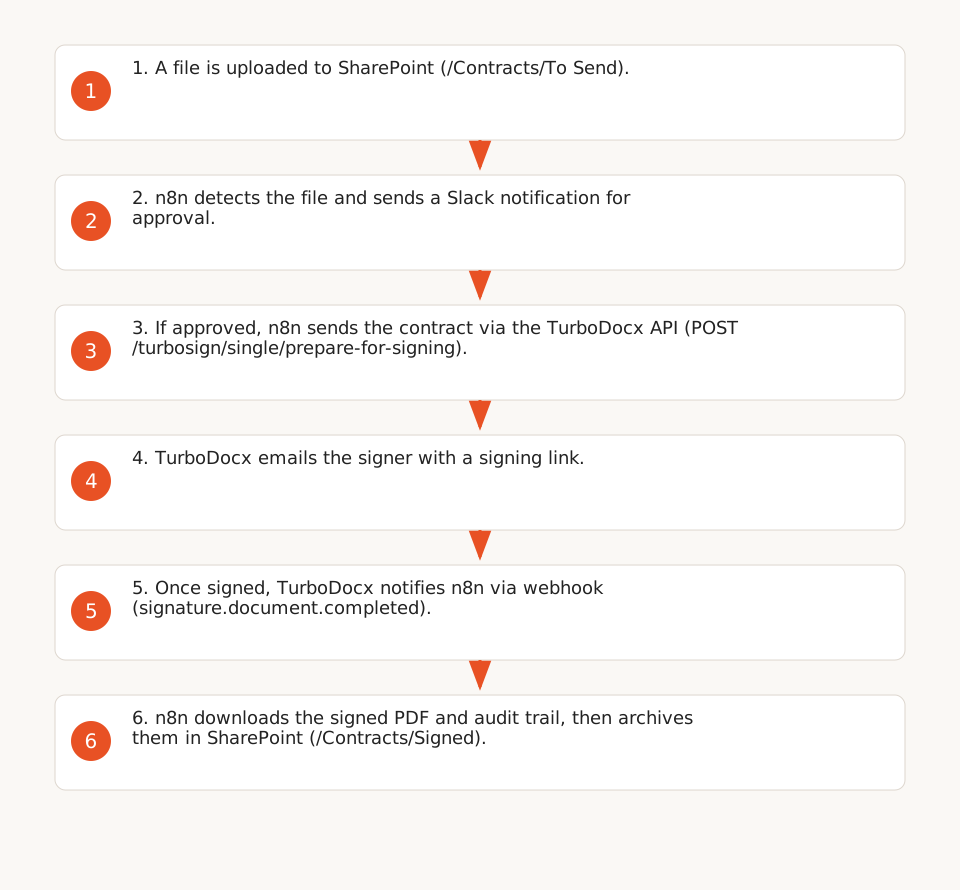
1. Trigger: File Upload to SharePoint
Use the SharePoint node in n8n to monitor a specific folder (e.g., /Contracts/To Send). As soon as a PDF or Word file is added, the workflow starts. SharePoint Online provides a REST API for file interactions, despite the end of Add-ins in April 2026.
2. Slack Approval: A Notification to Validate Sending
The Slack node sends a message to a dedicated channel (e.g., #contracts-approval) with two buttons: "Send" or "Reject." If "Send" is clicked, the workflow proceeds to the next step. Slack Workflow Builder enables these interactions without code, but this feature is reserved for paid plans (Pro, Business+).
3. Sending via TurboDocx: A REST API to Manage the Signature Lifecycle
The n8n "HTTP Request" node calls the TurboDocx API (POST /turbosign/single/prepare-for-signing) with the following parameters:
- PDF file to sign (retrieved from SharePoint).
- Recipients (name, email, signing order).
- Signature fields (positioned via anchors like
{signature1}).
TurboDocx then sends an email to the signer with a signing link. The API automatically handles reminders and follow-ups, returning a documentId to track status.
4. Archiving in SharePoint: Storing the Signed PDF and Audit Trail
As soon as TurboDocx notifies via webhook that the contract is signed (signature.document.completed), the workflow:
- Downloads the signed PDF via
GET /turbosign/documents/:documentId/download. - Retrieves the audit trail (
GET /turbosign/documents/:documentId/audit-trail). - Uploads both files to a dedicated SharePoint folder (e.g.,
/Contracts/Signed).
The audit trail includes each action (view, signature) with IP and timestamp, compliant with eIDAS traceability requirements.
Verified Costs: ~€45/Month for 20 Contracts/Month
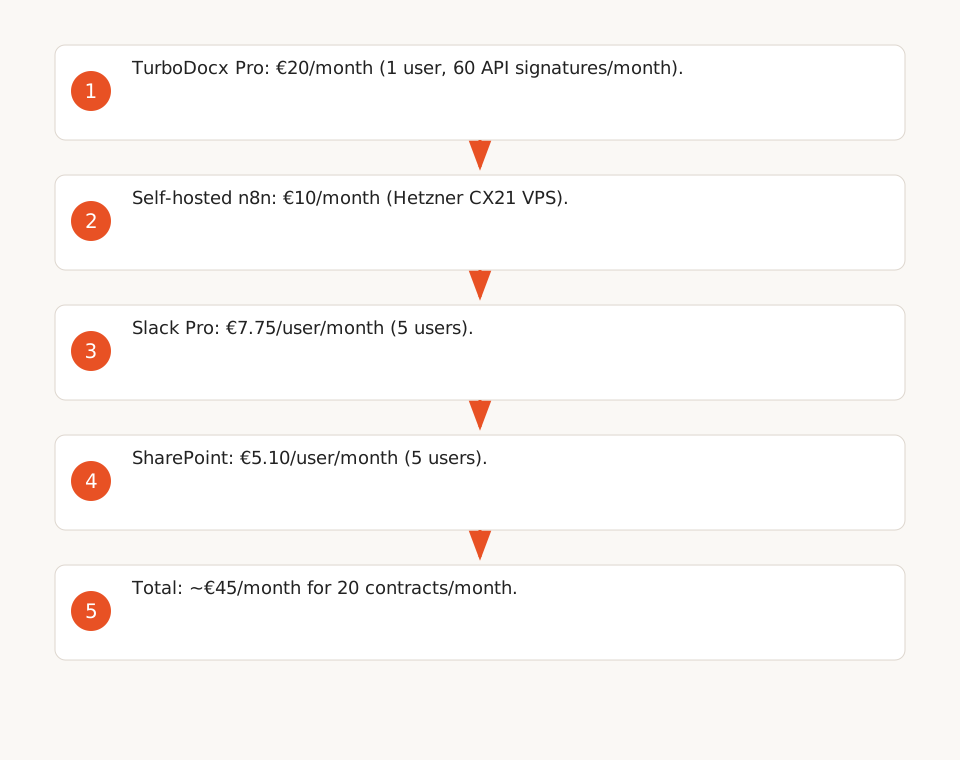
Here’s a cost estimate for an SME processing 20 contracts/month:
| Service | Plan | Monthly Cost | Limits |
|---|---|---|---|
| TurboDocx | Pro | €20/user (1 user) | 60 API signatures/month (then €0.30/signature). |
| n8n | Self-hosted (e.g., Hetzner CX21) | €10/month | No workflow limits. |
| Slack | Pro | €7.75/user (5 users) | Workflow Builder included. |
| SharePoint | Microsoft 365 Business Basic | €5.10/user (5 users) | 1 TB storage. |
| Total | ~€45/month |
Assumptions:
- 1 TurboDocx Pro user (60 API signatures/month, sufficient for 20 contracts/month).
- Self-hosted n8n on a basic VPS (e.g., Hetzner CX21 at €10/month).
- 5 Slack and SharePoint users (sales/legal team).
If volume exceeds 60 signatures/month, the cost increases to €0.30 per additional signature. For 100 signatures/month, expect ~€57/month (€20 + 40 signatures × €0.30 + €10 + €7.75).
eIDAS Compliance: What TurboDocx Covers (and What’s Missing)
TurboDocx ensures partial compliance with the eIDAS regulation (EU 910/2014):
- Full audit trail: Each action (view, signature) is logged with IP and timestamp (source).
- Sealed PDFs: Signed contracts are timestamped (RFC 3161) and sealed with a PAdES certificate, compliant with European standards.
- ESIGN/UETA compliance: Signatures are valid in the U.S. and Europe, but TurboDocx does not explicitly confirm *qualified* eIDAS compliance (the highest level).
Key considerations:
- The n8n/Slack/SharePoint workflow itself is not covered by eIDAS. Only the signature via TurboDocx is.
- For qualified compliance, you’d need a certified eIDAS provider (e.g., DocuSign, Yousign) in addition to TurboDocx.
- TurboDocx webhooks are HMAC-signed, but their integration into n8n must be secured (verify the signature server-side).
Limitations and Risks to Anticipate
1. TurboDocx API Limits
- The Pro plan limits API signatures to 60/month. Beyond that, each signature costs €0.30 (source).
- *In-app* signatures (via the TurboDocx interface) are unlimited but unsuitable for automation.
2. Dependence on n8n Connectors
- n8n does not offer a native TurboDocx connector. You must use the "HTTP Request" node and manually configure API calls.
- Slack and SharePoint connectors exist, but their stability depends on updates to the underlying APIs.
3. SharePoint Add-ins Obsolescence
Since April 2026, SharePoint Add-ins no longer work on SharePoint Online. Integrations must use REST APIs or Microsoft Graph. The workflow proposed here uses REST APIs, which remain available.
4. Partial eIDAS Compliance
TurboDocx covers basic requirements (audit trail, PAdES) but not qualified compliance. For sensitive contracts (e.g., real estate, legal), consider a certified eIDAS provider in addition.
Implementation Checklist
To deploy this workflow, follow these steps:
- Configure TurboDocx:
- Create a Pro account and generate an API key.
- Set up webhooks to receive status notifications (
POST /api/webhooks). - Prepare SharePoint:
- Create two folders:
/Contracts/To Sendand/Contracts/Signed. - Verify permissions to allow n8n to access files.
- Configure Slack:
- Create a channel
#contracts-approvaland install the n8n app. - Set up a Slack workflow for notifications ("Send"/"Reject" buttons).
- Deploy the n8n Workflow:
- Import the JSON template below (adapt with your API keys and SharePoint paths).
- Test the workflow with a dummy contract before going live.
{
  "nodes": [
    {
      "parameters": {
        "authentication": "oAuth2",
        "resource": "drive",
        "operation": "watch",
        "path": "/Contracts/To Send",
        "options": {
          "watchFor": "file"
        }
      },
      "name": "SharePoint Trigger",
      "type": "n8n-nodes-base.microsoftSharePoint",
      "typeVersion": 1,
      "position": [200, 300]
    },
    {
      "parameters": {
        "channel": "#contracts-approval",
        "text": "=A new contract is ready to send: {{ $node["SharePoint Trigger"].json["name"] }}. Approve?",
        "attachments": [
          {
            "blocks": [
              {
                "type": "actions",
                "elements": [
                  {
                    "type": "button",
                    "text": {
                      "type": "plain_text",
                      "text": "Send"
                    },
                    "value": "send",
                    "style": "primary"
                  },
                  {
                    "type": "button",
                    "text": {
                      "type": "plain_text",
                      "text": "Reject"
                    },
                    "value": "reject",
                    "style": "danger"
                  }
                ]
              }
            ]
          }
        ]
      },
      "name": "Slack Notification",
      "type": "n8n-nodes-base.slack",
      "typeVersion": 1,
      "position": [400, 300]
    },
    {
      "parameters": {
        "requestMethod": "POST",
        "url": "https://api.turbodocx.com/turbosign/single/prepare-for-signing",
        "options": {
          "bodyContentType": "json"
        },
        "bodyParametersJson": {
          "file": "={{ $node["SharePoint Trigger"].json["content"] }}",
          "documentName": "={{ $node["SharePoint Trigger"].json["name"] }}",
          "recipients": [
            {
              "name": "Client",
              "email": "client@example.com",
              "signingOrder": 1
            }
          ],
          "fields": [
            {
              "type": "signature",
              "recipientEmail": "client@example.com",
              "template": {
                "anchor": "{signature1}",
                "placement": "replace",
                "size": {
                  "width": 100,
                  "height": 30
                }
              }
            }
          ]
        },
        "headerParametersJson": {
          "Authorization": "Bearer {{ $env.TURBODOCX_API_KEY }}",
          "Content-Type": "application/json"
        }
      },
      "name": "TurboDocx Send",
      "type": "n8n-nodes-base.httpRequest",
      "typeVersion": 1,
      "position": [600, 300]
    },
    {
      "parameters": {
        "requestMethod": "GET",
        "url": "=https://api.turbodocx.com/turbosign/documents/{{ $node["TurboDocx Send"].json["documentId"] }}/download",
        "options": {},
        "headerParametersJson": {
          "Authorization": "Bearer {{ $env.TURBODOCX_API_KEY }}"
        }
      },
      "name": "TurboDocx Download",
      "type": "n8n-nodes-base.httpRequest",
      "typeVersion": 1,
      "position": [800, 300]
    },
    {
      "parameters": {
        "authentication": "oAuth2",
        "resource": "drive",
        "operation": "upload",
        "path": "/Contracts/Signed/{{ $node["SharePoint Trigger"].json["name"] }}",
        "binaryPropertyName": "data",
        "options": {}
      },
      "name": "SharePoint Archive",
      "type": "n8n-nodes-base.microsoftSharePoint",
      "typeVersion": 1,
      "position": [1000, 300]
    }
  ],
  "connections": {}
}
Alternatives and Possible Evolutions
1. Replace TurboDocx with a Qualified eIDAS Provider
For full eIDAS compliance (qualified level), consider:
- Yousign: eIDAS-qualified API, but more expensive (from €50/month for 10 signatures).
- DocuSign: Market leader, but costly (from €25/user/month).
2. Automate Contract Generation
If your contracts are standardized, use TurboDocx’s Deliverable module to generate the PDF before signing, via a single API call (deliverableId). This avoids manually uploading the file to SharePoint.
3. Integrate Salesforce
TurboDocx offers an open-source Salesforce app to send contracts from Salesforce and save the signed PDF. This integration is included in Pro/Enterprise plans.
Conclusion: An Operational Workflow in 2 Hours, with Key Limitations
This n8n workflow automates contract sending, tracking, and archiving for e-signature, with controlled costs (~€45/month) and partial eIDAS compliance. The main limitations are:
- The 60-signature/month cap via TurboDocx Pro’s API.
- The lack of *qualified* eIDAS compliance (required for sensitive contracts).
- Dependence on n8n connectors for Slack and SharePoint.
To go further, explore our no-code automation solutions or our n8n guides.