
Why Multi-Tenancy? The Cosmos DB Case
Multi-tenancy allows a single database instance to serve multiple customers (or tenants) simultaneously, reducing operational costs and simplifying management (F3). Microsoft highlights large-scale applications as examples of using Cosmos DB for services requiring reliability and low maintenance (F1). An SME must balance:
- Cost efficiency: Sharing infrastructure among tenants divides expenses.
- Isolation: Ensuring one tenant’s data or performance doesn’t impact others.
These goals often conflict (F11). Here’s how to reconcile them based on your needs.
The Two Multi-Tenancy Models in Cosmos DB
1. Partition Key-per-Tenant: The Cost/Isolation Trade-Off
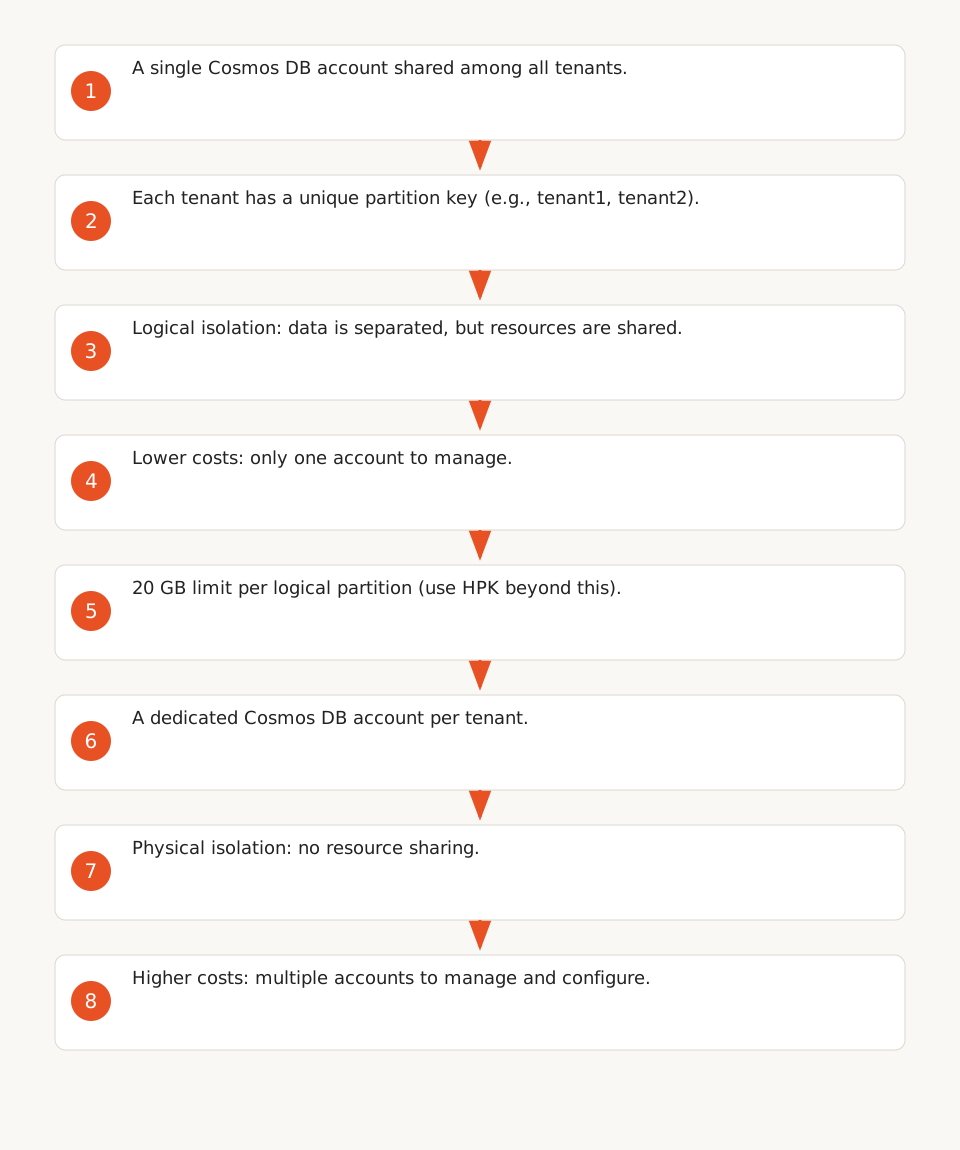
Principle: Each tenant is assigned a unique partition key within the same Cosmos DB container. Data is logically separated, but infrastructure is shared (F4).
Advantages:
- Cost-effective: Only one Cosmos DB account to manage, reducing infrastructure costs (F6).
- Scalable: Can handle hundreds of thousands of tenants with simplified management.
- Flexible: Ideal for homogeneous workloads (e.g., all tenants have similar data volumes).
Drawbacks:
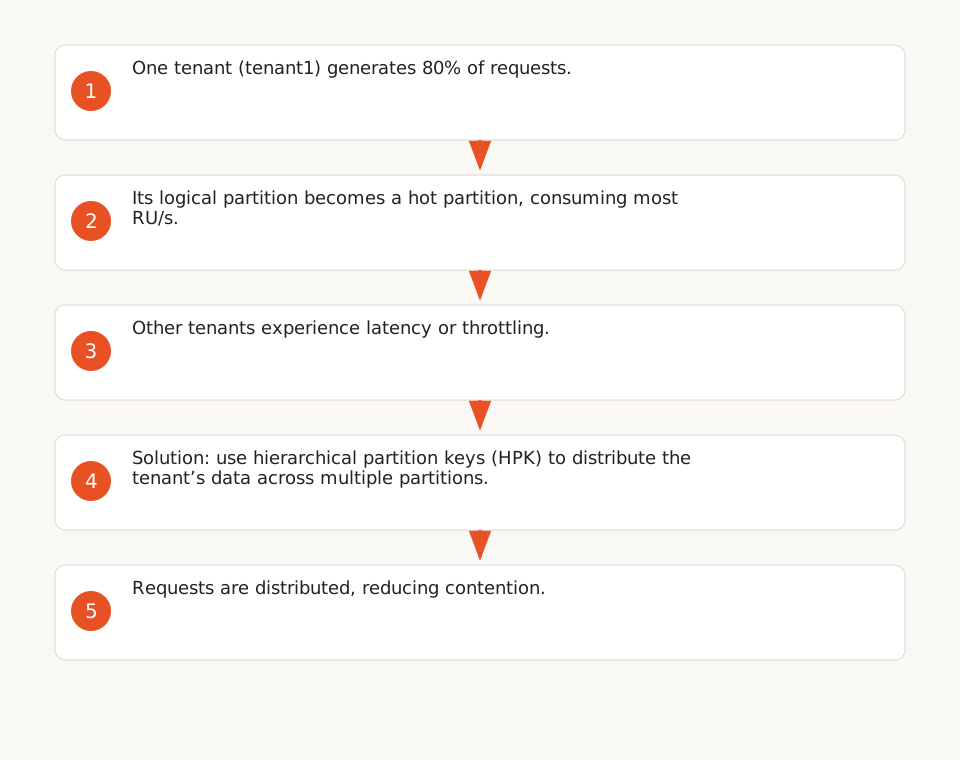
- Resource contention: A high-load tenant can impact others’ performance (F6).
- 20 GB limit per logical partition: Beyond this, hierarchical partition keys (HPK) are needed to extend capacity (F5, F12). A logical partition can also consume up to 10,000 RU/s (F12).
- Limited isolation: No physical isolation (e.g., a malicious tenant could, in case of a breach, access another’s data).
Use cases for SMEs:
- Internal applications with distinct teams or services (e.g., CRM, project management).
- B2B SaaS with similarly sized clients (e.g., 100–1,000 users per tenant).
- Prototypes or MVPs where cost outweighs isolation needs.
2. Account-per-Tenant: Maximum Isolation
Principle: Each tenant has its own Cosmos DB account, with complete physical isolation (F7).
Advantages:
- Total isolation: No risk of contention or interference between tenants.
- Custom SLAs: Each tenant can have distinct performance guarantees.
- Enhanced security: Encryption with customer-managed keys via Azure Key Vault (F9).
- Flexibility: Enable account-level features (e.g., geo-replication, point-in-time restore).
Drawbacks:
- Higher costs: Multiple Cosmos DB accounts increase infrastructure expenses (F8).
- Management complexity: More accounts to monitor, configure, and maintain.
Use cases for SMEs:
- Regulated sectors (e.g., healthcare, finance) where data isolation is mandatory.
- Clients requiring strict SLAs (e.g., guaranteed response times).
- Critical applications where security outweighs cost (e.g., sensitive data management).
Other Isolation Models in Cosmos DB
Cosmos DB offers two additional approaches for specific needs:
Container Isolation
Principle: Each tenant has its own container within a shared Cosmos DB account (F10).
- Advantages: Better isolation than partition key-per-tenant, simpler management than account-per-tenant.
- Drawbacks: No physical isolation, risk of contention if one container monopolizes resources.
Database Isolation
Principle: Each tenant has its own database within a Cosmos DB account (F10).
- Advantages: Enhanced isolation, resource allocation at the database level.
- Drawbacks: Intermediate cost and complexity, no physical isolation.
When to use them?
- Container isolation: For tenants with vastly different data schemas (e.g., one stores images, another logs).
- Database isolation: For tenants requiring distinct configurations (e.g., custom indexes).
SME Checklist: Migrating to Multi-Tenancy
Here’s a step-by-step approach to adopting multi-tenancy in Cosmos DB, inspired by Microsoft’s official recommendations (F4):
-
Assess isolation needs:
- Are tenant data sensitive (e.g., medical records)? → Prioritize account-per-tenant.
- Do tenants have similar workloads? → Partition key-per-tenant is sufficient.
-
Estimate costs:
- Use the Azure Pricing Calculator to compare partition key-per-tenant (1 account) vs account-per-tenant (N accounts).
-
Test for contention:
- Simulate workloads with the Cosmos DB Emulator or Azure Monitor.
- Check for hot partitions (overloaded partitions) with queries like:
SELECT TOP 100 * FROM c WHERE c._partitionKey = "tenant1"
-
Start with a pilot:
- Choose 10–20 representative tenants (e.g., internal teams or beta testers).
- Implement the chosen model and monitor performance for 1–2 months.
-
Plan the migration:
- For partition key-per-tenant:
- Add a
tenantIdfield to each document and use it as the partition key. - Configure hierarchical partition keys if a tenant exceeds 20 GB (F5).
- Add a
- For account-per-tenant:
- Automate account creation with Azure Bicep or Terraform.
- Set up customer-managed keys for encryption (F9).
- For partition key-per-tenant:
Decision Tree for Choosing a Model
- Physical isolation mandatory? → Account-per-tenant.
- Tight budget and similar tenants? → Partition key-per-tenant.
- Vastly different data schemas? → Container isolation.
- Distinct configurations per tenant? → Database isolation.
Limitations and Alternatives for SMEs
Pitfalls to Avoid
- Underestimating contention: A single tenant can degrade performance for all others in a shared model. Monitor Cosmos DB metrics (e.g., Request Units consumed).
- Ignoring the 20 GB limit per logical partition: Beyond this, queries slow down. Use HPK or migrate to account-per-tenant.
- Neglecting security: Even with logical isolation, breaches can expose data. Enable encryption at rest and in transit.
Alternatives to Cosmos DB
If budget is tight or NoSQL expertise is lacking, consider these options:
-
PostgreSQL with multi-tenancy extensions:
- Use separate schemas (
tenant1.table,tenant2.table) or atenant_idfield. - Advantages: Lower cost, mature ecosystem, support for complex queries.
- Drawbacks: Less scalable than Cosmos DB for millions of tenants.
- Use separate schemas (
-
Firebase/Firestore:
- Google’s serverless solution, ideal for small apps or MVPs.
- Advantages: Easy mobile integration, no infrastructure management.
- Drawbacks: Unpredictable costs at scale, less suited for structured data.
-
MongoDB Atlas:
- NoSQL alternative to Cosmos DB, with a similar pricing model.
- Advantages: Schema flexibility, support for geospatial queries.
- Drawbacks: Less integrated with Azure for SMEs already using Microsoft 365.
For more on implementing scalable architectures in SMEs, check out our guide on AI implementation in businesses.