
1. What Rovo Can (and Can’t) Do for Your Projects
Rovo provides three features to help turn your data into actionable items:
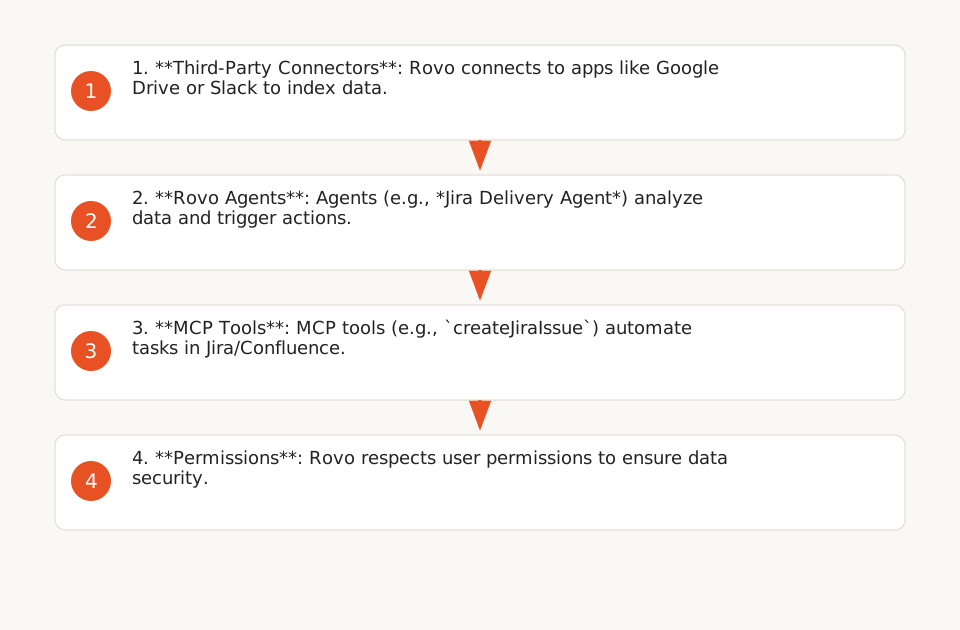
- Unified Search: Query Jira, Confluence, and third-party apps (Google Drive, Slack) simultaneously while respecting user permissions (F1). Example: Rovo can search for Confluence documents and Slack messages related to a bug via Rovo Search or a configured agent.
- Specialized Agents: Preconfigured AI agents for specific tasks, such as *Ops Expert* (JSM incident monitoring) or *Jira Delivery Agent* (delivery risk detection) (F2). These agents can be called via `/Rovo` in Jira/Confluence or integrated into automation rules.
- Third-Party Connectors: Sync data from Google Drive, GitHub, or SharePoint, with an index updated upon deletion (except for GitHub, which requires uninstalling the *GitHub for Jira* app) (F4).
Key Technical Limitations
- No Automatic Sprint Planning: Rovo cannot create sprints or milestones without human validation. It can identify delivery risks (e.g., delays on dependencies), but the final action (adjusting priorities) remains manual (F2).
- Permission Dependency: If a user lacks access to a Google Drive document, Rovo won’t display it — even if the agent is configured to search for it (F4). Verify permissions before connecting a third-party app.
- Connector Scope: By default, Rovo indexes the entire workspace of a third-party app (e.g., your entire Google Drive). Use a blocklist to exclude sensitive folders (F6).
- Data Retention: Rovo Chat and agent inputs/outputs are retained for 30 days for security. Deleted third-party data takes up to 30 days to disappear from the index (except GitHub) (F5).
2. 5 Priority Use Cases for Ops/Dev Teams (With Example Templates)
Note: These workflows are generic examples inspired by Atlassian documentation. Test them with your data before deployment.
Here are concrete scenarios to automate repetitive tasks, with Make.com or n8n templates. Each template includes:
- A trigger (e.g., Jira ticket creation);
- A Rovo action (e.g., calling an agent via API);
- A follow-up action (e.g., updating the ticket).
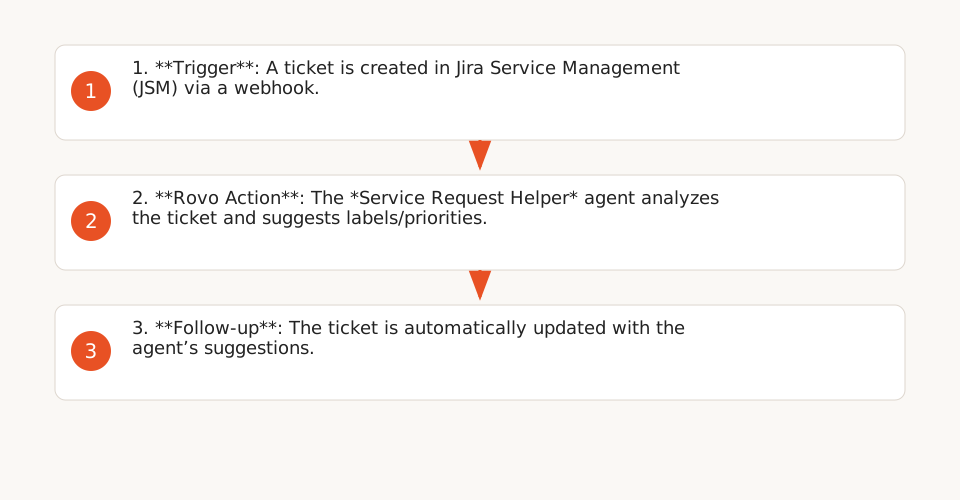
2.1. Automatic Triage of Jira Service Management (JSM) Requests
Problem: Support teams spend significant time manually triaging requests.
Solution: Use the *Service Request Helper* agent to classify tickets by priority and route them to the right team. The agent can extract keywords from descriptions (e.g., “invoice,” “VPN access”) and suggest labels automatically.
Make.com Template:- Trigger: New ticket created in JSM (webhook).
- Action: Call the *Service Request Helper* agent via Rovo API (endpoint:
https://api.atlassian.com/rovo/agent/{agentId}/execute). - Action: Update the ticket with suggested labels and priority.
See a similar Python example for error handling (e.g., agent unavailable).
2.2. Delivery Risk Monitoring in Jira
Problem: Delays on dependencies (e.g., an external API not delivered) are detected too late, often during status meetings.
Solution: The *Jira Delivery Agent* analyzes tickets and identifies risks (e.g., blocked tickets, unresolved dependencies). It can send Slack alerts or update a Confluence dashboard.
n8n Template:- Trigger: Jira ticket updated (webhook).
- Action: Call the *Jira Delivery Agent* to analyze dependencies.
- Condition: If risk detected → create a task in the backlog of the concerned team.
Official documentation for configuring the agent.
2.3. Automatic Jira Backlog Cleanup
Problem: Jira backlogs often contain obsolete tickets (e.g., abandoned features), complicating prioritization.
Solution: Create a custom agent in Rovo Studio to identify tickets inactive for over 90 days and suggest archiving. The agent can use the MCP tool listJiraIssues to retrieve tickets and apply filters.
- Trigger: Every Monday at 9 AM (scheduling).
- Action: Call the custom agent via Rovo API.
- Action: Send a Slack report with tickets to archive.
Example MCP query to list inactive tickets:
{
  "tool": "listJiraIssues",
  "parameters": {
    "jql": "updated < -90d AND status != Done",
    "fields": ["key", "summary", "updated"]
  }
}
2.4. Slack ↔ Jira Service Management Sync
Problem: Requests created in Slack are often lost or duplicated in JSM.
Solution: Use a Rovo agent to sync Slack conversations with JSM tickets. The agent can create a JSM ticket from a Slack message and update the thread with the ticket status.
n8n Template:- Trigger: New message in a dedicated Slack channel (e.g., #support).
- Action: Call the Rovo agent to create a JSM ticket (MCP tool
createJiraIssue). - Action: Update the Slack thread with the JSM ticket link.
Official guide for configuring the sync.
2.5. Automatic Jira Comment Summarization
Note: This template uses the OpenAI API, which may incur costs depending on your subscription.
Problem: Jira tickets with dozens of comments become unreadable, slowing down decision-making.
Solution: Create a Forge app (as in this tutorial) to summarize ticket comments using the OpenAI API. The app can be triggered manually via a button in the Jira panel.
Forge Template:- Trigger: “Summarize Comments” button in the Jira panel.
- Action: Retrieve comments via
.requestJira(). - Action: Call the OpenAI API to generate a summary.
- Action: Add the summary as a comment in the ticket.
Example code to call OpenAI:
const response = await fetch('https://api.openai.com/v1/chat/completions', {
  method: 'POST',
  headers: {
    'Authorization': `Bearer ${openAIKey}`,
    'Content-Type': 'application/json'
  },
  body: JSON.stringify({
    model: 'gpt-4',
    messages: [{ role: 'user', content: `Summarize these comments: ${comments}` }]
  })
});
3. Governance and Security: Safeguards to Implement
Rovo offers compliance guarantees (SOC2, ISO 27001, HIPAA), but its deployment requires precautions to avoid *shadow AI* or data leakage risks.
3.1. Permissions and Connector Scope
- Verify permissions before connecting a third-party app: Rovo syncs existing permissions but doesn’t correct them. For example, if a user has access to a sensitive Google Drive folder, Rovo will display it to them (F4). Use blocklists to exclude specific content (e.g., HR folders).
- Limit connector scope: By default, Rovo indexes the entire workspace of a third-party app (e.g., your entire Google Drive). For Google Drive and SharePoint, configure a blocklist to exclude sensitive folders (F6).
- Manage data deletions: Data deleted in a third-party app takes up to 30 days to disappear from the Rovo index (except GitHub, which requires uninstalling the *GitHub for Jira* app) (F5). For critical data, disable the connector and wait for deletion.
3.2. Third-Party LLMs: Risks and Best Practices
- No data retention by providers: According to Atlassian, third-party LLM providers (OpenAI, Anthropic, Google) do not store Rovo inputs/outputs, but Atlassian retains them for 30 days for security (F8).
- Response variability: Like any probabilistic model, third-party LLM responses may vary. Test your agents with real datasets before deployment. For critical cases, prefer self-hosted models (Llama, Mixtral) (F8).
- MCP tool costs: MCP tools (e.g.,
createJiraIssue) may be billed according to your Atlassian subscription. Monitor your consumption via the admin dashboard.
3.3. Compliance and Data Residency
- Data residency: Rovo supports data residency for Atlassian Cloud Premium/Enterprise customers. Verify your region is covered here.
- HIPAA: Rovo can be used in a HIPAA-compliant manner. See the official guide for specific requirements.
- Agent auditing: Rovo agents can be shared across teams. Restrict access to sensitive agents via verified agents.
4. How to Extend Rovo with Technical Tools
Rovo exposes APIs and tools to interact with Jira and Confluence, but their use requires technical skills.
4.1. MCP Tools: An API to Automate Jira/Confluence
The Atlassian MCP server (integrated with Rovo) exposes tools to interact with Jira and Confluence, organized into permission groups (read, write, delete). Here are the most useful tools for automation:
getJiraIssue: Retrieve a Jira ticket by ID or key.createJiraIssue: Create a Jira ticket (requires theexecuteWritegroup).transitionJiraIssue: Change a ticket’s status (requiresexecuteWrite).getConfluenceContent: Retrieve a Confluence page by ID.discover: Dynamically discover tools via a natural language description and execute them with confirmation based on their risk tier (executeRead, executeWrite, executeDestructive) (F11).
Example call to createJiraIssue:
POST https://mcp.atlassian.com/v2/mcp/executeWrite
Headers:
  Authorization: Bearer {access_token}
  Content-Type: application/json
Body:
{
  "tool": "createJiraIssue",
  "parameters": {
    "projectKey": "PROJ",
    "issueType": "Task",
    "summary": "Fix bug #123",
    "description": "Bug #123 is blocking sprint 5 delivery."
  }
}
4.2. Forge: Extend Rovo with Custom Apps
Forge is Atlassian’s framework for creating custom apps. You can use it to:
- Create Rovo agents with specific tools (e.g., integration with an internal API);
- Automate complex workflows (e.g., Jira comment summarization with OpenAI) (F12).
Example Forge manifest for a comment summarization app:
modules:
  jira:issuePanel:
    - key: comment-summarizer
      function: main
      title: Summarize Comments
      icon: https://example.com/icon.png
  function:
    - key: main
      handler: index.run
permissions:
  scopes:
    - read:jira-work
    - write:jira-work
  external:
    fetch:
      backend:
        - api.openai.com
See the full tutorial to implement this app.
5. Common Pitfalls and How to Avoid Them
| Pitfall | Risk | Solution |
|---|---|---|
| Misaligned permissions | Users see data they shouldn’t have access to. | Verify third-party app permissions before connecting them to Rovo. Use blocklists to exclude sensitive content. |
| Overly broad connector scope | Rovo indexes unnecessary data (e.g., personal folders in Google Drive), increasing costs and risks. | Configure a blocklist for Google Drive/SharePoint. Disable unnecessary connectors. |
| Over-reliance on third-party LLMs | Agent responses may vary by model (GPT, Claude, etc.). | Test agents with real datasets. Prefer self-hosted models (Llama, Mixtral) for critical cases. |
| Data retention | Data deleted in a third-party app remains accessible via Rovo for 30 days (except GitHub). | For critical data, disable the connector and wait for deletion. For GitHub, uninstall the *GitHub for Jira* app. |
| MCP tool costs | MCP tools (e.g., createJiraIssue) may be billed according to your subscription. |
Monitor consumption via the admin dashboard. Restrict write/delete tool access to authorized users. |
| Untested agents | A misconfigured agent can produce erroneous results (e.g., incorrect JSM ticket routing). | Test agents with real scenarios. Use verified agents for critical workflows. |
6. Next Steps: Where to Start?
To leverage Rovo safely, follow this roadmap:
- Prioritize a simple use case: Start with a low-risk workflow, such as automatic JSM request triage (scenario 2.1) or Slack/JSM sync (scenario 2.4).
- Configure permissions and connectors: Verify third-party app permissions and configure a blocklist to exclude sensitive data.
- Test agents with real data: Use representative datasets to validate response consistency.
- Deploy gradually: Start with a pilot team and expand after validation.
- Monitor costs and performance: Use the admin dashboard to track MCP tool consumption and agent response times.
To go further:
- Read our guide on AI agents to understand their functionality and limitations.
- Learn how to implement AI in your company without losing control over data.
- Explore real-world AI agent use cases for similar scenarios.