
What Is Personal Intelligence in Google Search?
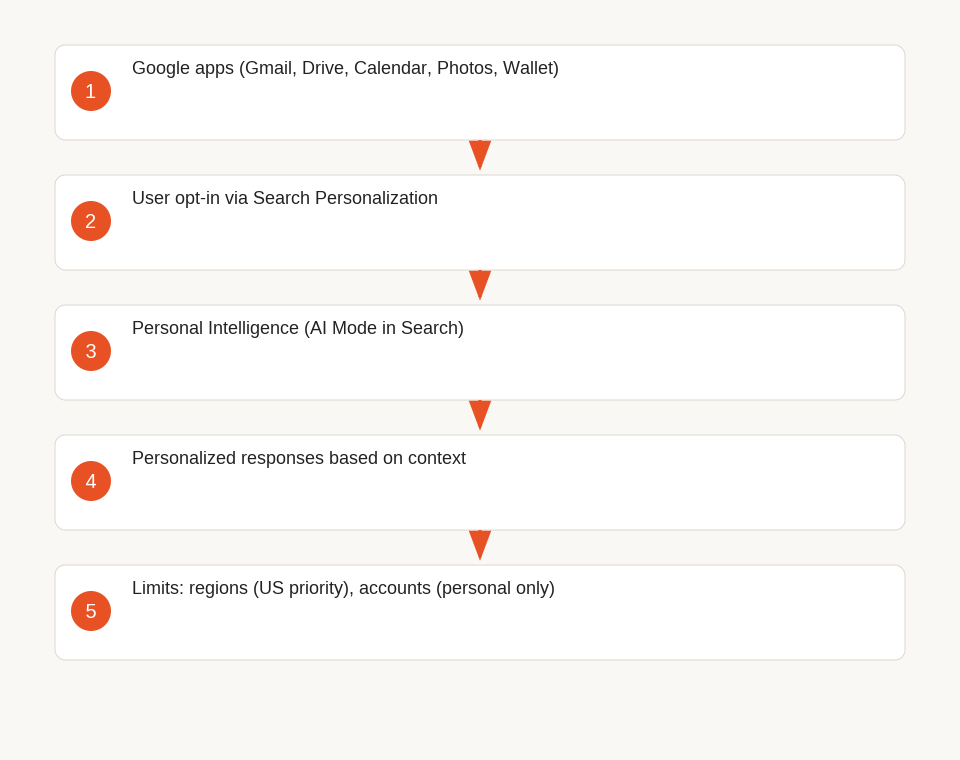
Personal Intelligence is a feature in Google Search’s AI Mode that connects your Google apps (Gmail, Drive, Calendar, Photos, Wallet) to deliver personalized responses. Unlike standard search, it uses your personal context (emails, documents, bookings) to refine results. Example: If you search for "family weekend activities," AI Mode can cross-reference your hotel booking (Gmail) and travel photos (Google Photos) to suggest a tailored itinerary (F3).
Connectable Apps and User Control
The compatible apps are limited and require strict opt-in:
- Gmail, Calendar, Google Photos: Available in most regions (F2).
- Google Drive: Restricted to US users in English (F2).
- Google Wallet: Limited regions (F1).
- Gemini Apps: Context sharing between Search and Gemini App (e.g., continue a conversation without repeating info) (F4).
You can enable/disable each app via Search Services Personalization (F2). Data is not used to train models but referenced to answer your queries (F6).
Availability and Restrictions
- Eligible accounts: Personal Google accounts only (excludes Workspace business/enterprise/education) (F5).
- Regions: Beta for AI Pro/Ultra subscribers in the US (English), with gradual expansion (F5).
- Languages: US English for Drive; other apps available in multiple languages (F2).
Verified Business Use Cases (and Their Limits)
Sources document concrete examples, but no repeatable automated workflows are possible without manual input. Here are the supported use cases:
1. Sector Monitoring and Personalized Recommendations
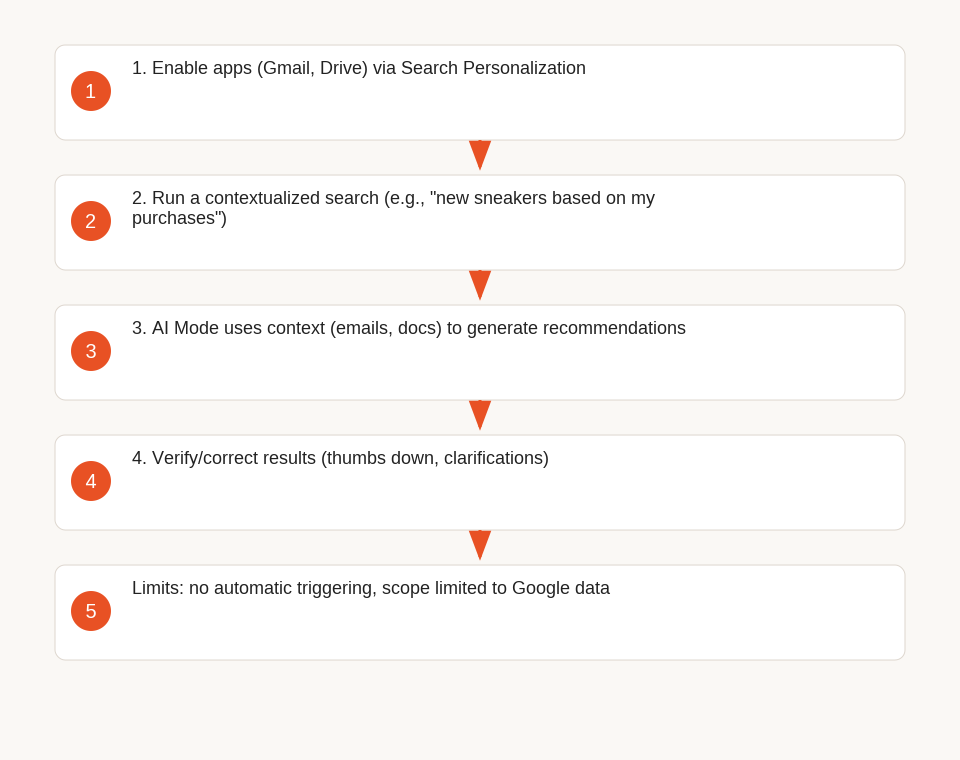
How it works: AI Mode uses your emails (Gmail) and documents (Drive) to suggest products, services, or news aligned with your interests. Example: If you receive sneaker newsletters (Gmail) and store comparisons (Drive), AI Mode can recommend new models based on past purchases (F3).
Limitations:
- No automatic triggering: You must initiate the search manually.
- Limited to Google data: No integration with external tools (e.g., CRM, business databases).
- Over-personalization risk: AI Mode may make incorrect connections (e.g., associating golf photos with an interest in the sport, when they relate to a family member) (F7).
2. Project Management and Document Synthesis
How it works: AI Mode can cross-reference scattered information in Drive (docs, sheets, PDFs) to generate summaries or action plans. Example: Searching for "prepare tax return" can extract data from your Drive files to create a personalized checklist (F4).
Limitations:
- Restricted to US users (Drive) (F2).
- No real-time updates: Data must be manually refreshed in Drive.
- Potential errors: AI Mode may misinterpret context (e.g., confusing two similar projects) (F7).
3. Expense Tracking and Financial Optimization
How it works: By connecting Google Wallet, AI Mode can analyze spending to identify savings (e.g., optimize cashback categories) or track financial milestones (F1).
Limitations:
- Limited regions (F1).
- No data export: Insights remain within Search/AI Mode.
- No integration with accounting tools (e.g., QuickBooks).
How to Integrate Personal Intelligence into Your Workflows
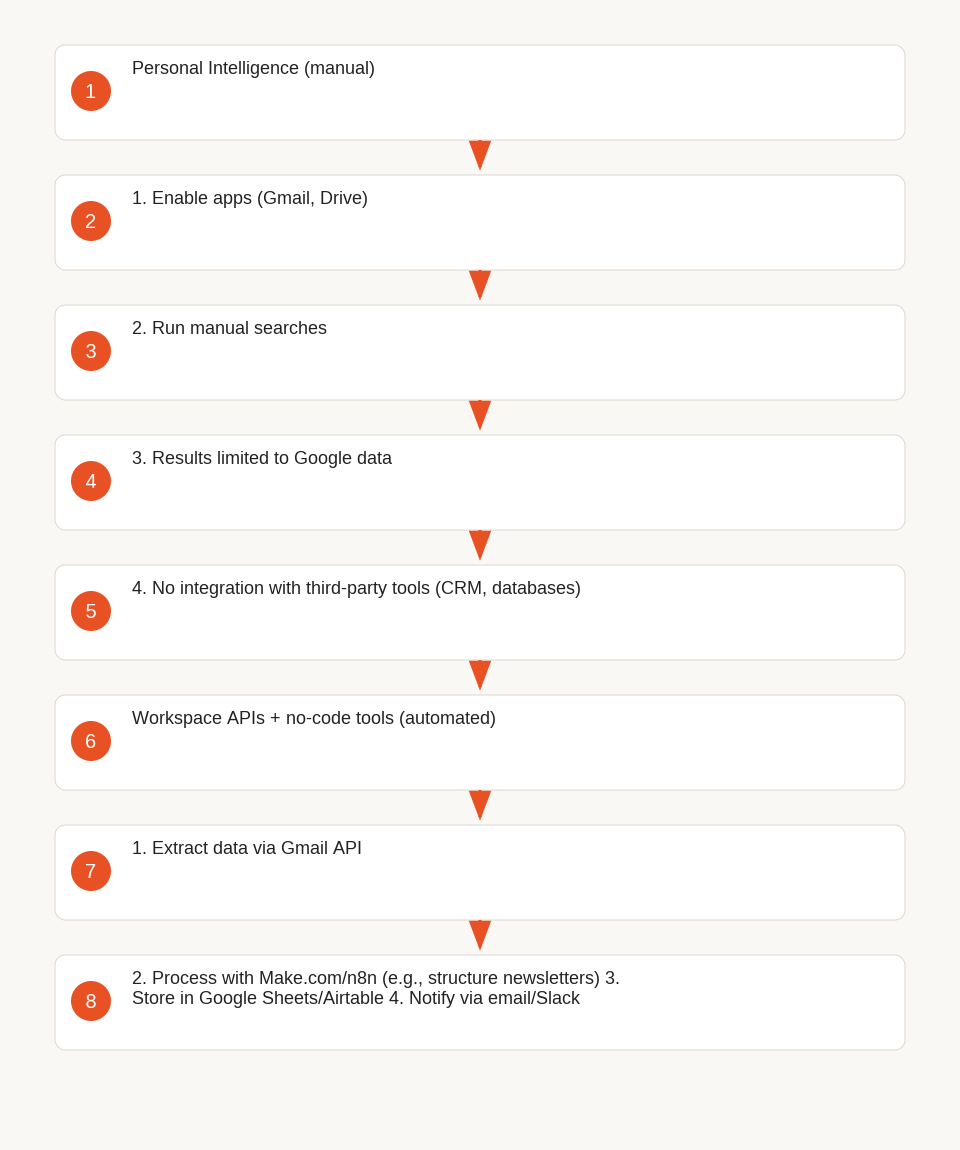
Personal Intelligence lacks a public API for automating tasks (F11). Here are the available methods:
1. Manual Setup (Opt-In and Queries)
- Enable apps: Go to Search Personalization > Connected Apps and select the apps to connect (Gmail, Drive, etc.) (F2).
- Run contextualized queries: Ask specific questions using keywords tied to your data. Example: "What are the upcoming tax deadlines based on my Drive documents?" (F4).
- Correct errors: Use the thumbs down button or clarify in natural language (e.g., "I’m not interested in golf") (F7).
2. Use Search Agents (Beta)
Search Agents (available to AI Pro/Ultra subscribers) let you create 24/7 monitoring agents for specific topics (e.g., housing announcements, sector news). Example: An agent can scan the web for apartments matching your criteria and notify you (F8).
Limitations:
- Beta limited to the US (F8).
- No personalization based on your Google data (unlike AI Mode).
- No integration with external tools (e.g., Make.com).
3. Share Context Between Gemini App and Search
You can continue a conversation started in Gemini App directly in Search/AI Mode, and vice versa. Example: If you explore travel ideas in Gemini App, AI Mode can use this context to suggest activities (F4).
Limitation: No automatic sync with third-party tools.
Technical Limits and Risks
1. Availability and Compatibility
- Excluded accounts: Workspace business/enterprise/education (F5).
- Regions: US priority, gradual expansion (F5).
- Languages: US English for Drive; other apps available in multiple languages (F2).
2. Personalization Errors
- AI Mode may make incorrect connections between unrelated topics (e.g., associating golf photos with an interest in the sport) (F7).
- Sensitive data (e.g., health, finances) is handled cautiously, but errors are possible (F6).
3. Quotas and Indirect Costs
Manual Personal Intelligence does not consume API quotas. However, if you later use Workspace APIs (Gmail, Calendar) for automated workflows, limits apply:
- Gmail API: 1.2M quota units/minute/project (Standard Tier) (F9).
- Calendar API: 10K requests/minute/project (F10).
Projects exceeding these limits must switch to the Scaled Tier (paid) (F9).
4. GDPR and Privacy
- Data from connected apps is stored in your Google account and subject to its privacy policies.
- You can disable personalization or delete history at any time (F2).
- No data export to third-party tools (e.g., CRM).
Alternative: Automate with Workspace APIs + No-Code Tools
If Personal Intelligence doesn’t meet your automation needs, here’s an alternative:
Example Workflow: Automated Sector Monitoring
- Data collection: Use the Gmail API to extract relevant newsletters or emails (e.g., sector news).
- Processing: Send data to a no-code tool like Make.com or n8n to structure it (e.g., extract titles and links).
- Storage: Save results in Google Sheets or Airtable.
- Notification: Set up alerts (email, Slack) for new entries.
Advantages:
- Full automation (no manual input).
- Integration with third-party tools (CRM, databases).
- Full data control (GDPR).
Limitations:
- Requires technical skills (or a no-code tool).
- API quotas to respect (F9, F10).
- No personalization based on Google context (e.g., photos, bookings).
For a detailed guide, read our article on Make.com + OpenAI in 2026.
Conclusion: Personal Intelligence Is Useful but Limited
Personal Intelligence in Google Search delivers contextualized responses for business use cases like sector monitoring or project management, but does not enable repeatable automated workflows without manual input. Key limitations include:
- No public API to trigger personalized searches.
- Restricted to personal Google accounts (excludes Workspace business).
- Limited geographic and language availability (US priority).
- Risks of personalization errors and sensitive data exposure.
For automated workflows, prioritize Workspace APIs (Gmail, Calendar) + no-code tools like Make.com or n8n. These solutions offer more flexibility and control, though they require initial setup.
To explore alternatives for automating business processes, read our guide to AI implementation in enterprises.