1. Security: MCP vs Traditional Integrations
The MCP protocol enforces strict security requirements (F1, F2, F3), aligned with OAuth 2.1 and designed to mitigate risks common to AI integrations:
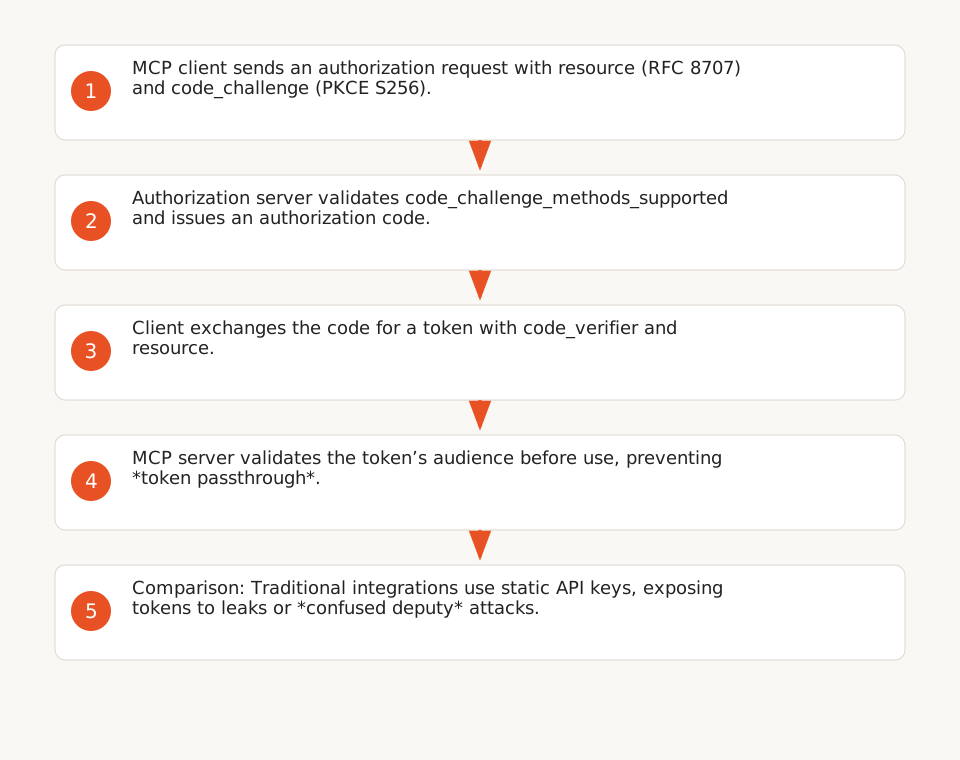
- Mandatory audience validation: MCP servers must validate that tokens are issued specifically for their use (F1), preventing *token passthrough* (F3). In contrast, traditional integrations (e.g., static API keys) expose tokens to leaks or *confused deputy* attacks (F4).
- PKCE and OAuth metadata: MCP requires PKCE implementation with the
S256method, and clients must verify the presence ofcode_challenge_methods_supportedin the OAuth provider’s metadata (F2). Traditional integrations, such as n8n’s webhooks or *HTTP Request* nodes, do not enforce these checks by default. - Server isolation: MCP separates servers (exposing tools or prompts) from clients (created by the host), limiting token scope and permissions (F6). Traditional integrations, like Azure Functions connectors (E1), often centralize access, increasing compromise risks.
Residual Risks and Limitations
- Confused deputy: MCP does not fully eliminate this risk for proxy servers (e.g., n8n exposing workflows to external MCP clients). An attacker can exploit consent cookies or malicious redirects if the server uses a *static client ID* (F4). Mitigation requires per-client consent and strict
redirect_urivalidation (F5). - Workflow visibility: In n8n, instance-level MCP access exposes all MCP-enabled workflows to all connected clients (e.g., Claude Desktop, Lovable), with no per-client restrictions (F12). Traditional integrations, like *HTTP Request* nodes, allow finer control (e.g., tokens per workflow).
2. Costs: Execution Granularity and Pricing Model
n8n’s pricing is based on the number of workflow executions per month, regardless of complexity (F8):
- Starter Plan: 2,500 executions/month (ideal for testing).
- Pro Plan: 25,000 executions/month (teams under 100 employees).
- Enterprise Plan: 50,000 executions/month (custom options).
MCP’s Impact on Costs
- MCP advantage: MCP enables granular task breakdown (e.g., one tool per step), reducing total executions. In a hypothetical scenario, a traditional workflow processing 10,000 tasks in 10,000 executions could be replaced by 2,000 MCP executions (5 tasks per execution), cutting costs by 80%. This gain depends on the ability to group calls without compromising security (e.g., audience validation for each tool).
- Traditional integrations advantage: For heavy processing (e.g., PDF report generation via Azure Functions, E1), traditional integrations remain more cost-effective, as a single execution can encompass multiple steps (e.g., Microsoft Graph call + LLM + SharePoint storage).
3. Maintainability: Modularity vs Fine-Grained Control
MCP’s Modular Architecture
MCP is built on a modular architecture (F6):
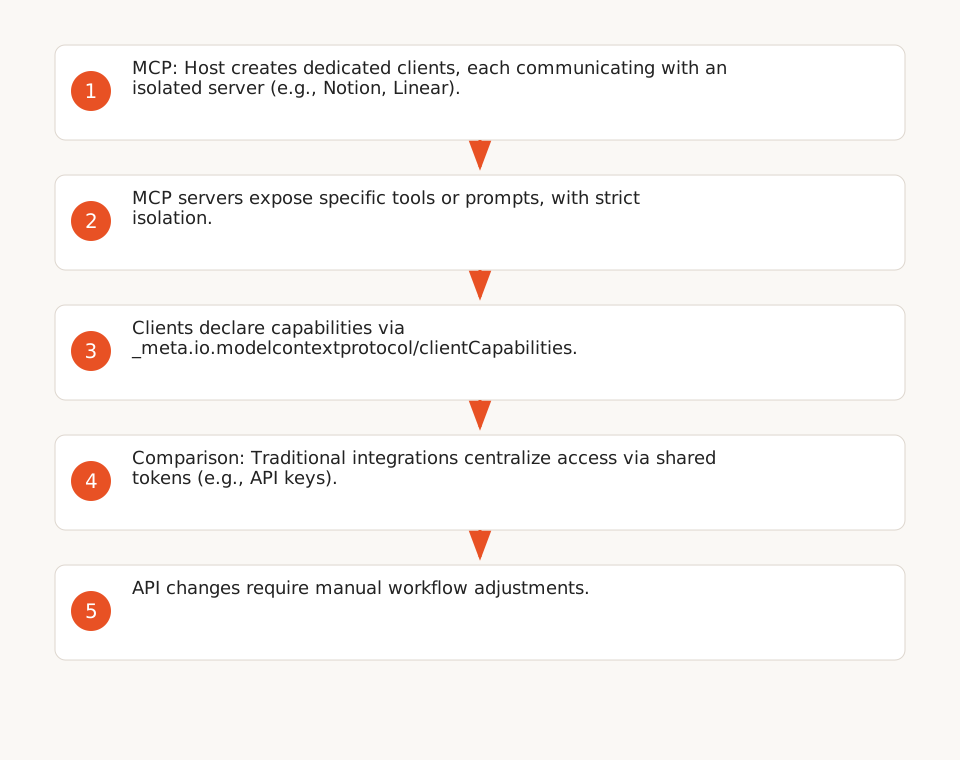
- Isolated servers: Each server exposes specific tools or prompts, with strict isolation (e.g., one server for Notion, another for Linear). This simplifies updates and limits dependencies.
- Capability negotiation: Servers and clients declare their supported features (e.g., tools, resource subscriptions) via
server/discoverand_meta.io.modelcontextprotocol/clientCapabilities(F7). This avoids incompatibilities and reduces manual adjustments. - n8n Registry: n8n provides an integrated MCP server registry (F9), accessible with one click from the node panel. A server’s tools can be exposed to an AI agent via the *MCP Client Tool* node, with filtering options (all, selected, or excluded).
Fine-Grained Control of Traditional Integrations
Traditional integrations (e.g., *HTTP Request* nodes, Azure Functions connectors) offer finer control over parameters, but at the cost of reduced maintainability:
- Manual token management: API keys or OAuth tokens must be renewed manually (e.g., every 90 days for Microsoft Graph), increasing operational overhead. MCP automates part of this process via OAuth 2.1 (F1).
- External dependencies: API changes (e.g., SharePoint endpoint modifications, E1) require manual workflow adjustments. MCP limits these risks through *capability negotiation* (F7).
- Limited visibility: Traditional integrations lack a centralized view of available tools, unlike n8n’s MCP registry (F9).
4. Practical Integration in n8n
MCP in n8n: Registry and Limitations
n8n simplifies MCP integration through:
- MCP Registry: A registry of MCP servers accessible with one click (F9), with built-in authentication (e.g., Notion, Linear). A server’s tools can be exposed to an AI agent via the *MCP Client Tool* node, with tool filtering (all, selected, or excluded).
- MCP Client Tool: For manually connecting to MCP servers not in the registry (F10), supporting HTTP/HTTPS transports and authentications (Bearer, OAuth2, multiple headers).
- Instance-level MCP access: A single connection per n8n instance exposes workflows or agents to external MCP clients (e.g., Claude Desktop, Lovable), but without per-client restrictions (F12). Workflows must be explicitly enabled for MCP, and visibility remains user-permission-based.
n8n Template to Test MCP Locally
To evaluate MCP, use this n8n template (import via *Import from URL*):
{
  "name": "MCP Test Template",
  "nodes": [
    {
      "parameters": {
        "authentication": "oAuth2",
        "serverTransport": "https",
        "mcpEndpointUrl": "https://mcp.notion.com/mcp",
        "tool": "search_pages",
        "inputMode": "manual",
        "options": {}
      },
      "name": "MCP Client Tool",
      "type": "n8n-nodes-langchain.mcpClientTool",
      "typeVersion": 1,
      "position": [400, 300]
    }
  ],
  "connections": {}
}
This template connects to a Notion MCP server and exposes the search_pages tool to an AI agent. To adapt it:
- Replace
mcpEndpointUrlwith your MCP server’s URL. - Configure OAuth2 (F1, F2) or Bearer authentication.
- Filter exposed tools via
Tools to include(F9).
MCP Limitations in n8n
- Workflow exposure: All connected MCP clients see all MCP-enabled workflows (F12), which may raise confidentiality concerns for sensitive projects. No per-client restrictions are possible.
- Per-client consent: MCP requires explicit consent for each client (F5), which can complicate user onboarding. Traditional integrations (e.g., API keys) skip this step.
- Compatibility: MCP requires OAuth 2.1-compatible servers (F1). Legacy APIs (e.g., SOAP, FTP) are not supported without adaptation.
5. Checklist: When to Choose MCP vs Traditional Integrations
Use this table to decide between the two approaches:
| Criterion | MCP | Traditional Integrations (APIs/Webhooks) |
|---|---|---|
| Security | ✅ OAuth 2.1, PKCE, audience validation (F1, F2). ✅ Server isolation (F6). ⚠️ *Confused deputy* risk for proxy servers (F4). |
❌ Static API keys, non-isolated tokens. ❌ *Token passthrough* risk (F3). ✅ Fine-grained permission control (e.g., tokens per workflow). |
| Costs | ✅ Optimized for granular workflows (fewer executions/month, F8). ⚠️ Potential OAuth 2.1 validation overhead (not evaluated in this guide). |
✅ Cost-effective for heavy processing (e.g., report generation, E1). ❌ Expensive for lightweight workflows (1 task = 1 execution). |
| Maintainability | ✅ Modular architecture (F6). ✅ *Capability negotiation* (F7). ✅ Integrated registry in n8n (F9). |
❌ Manual token and dependency management. ❌ Frequent adjustments for API changes. ✅ Fine-grained parameter control (e.g., *HTTP Request* nodes). |
| Use Cases | ✅ Projects requiring enhanced security (e.g., sensitive data). ✅ Modular scalability (e.g., adding servers without overhaul). ✅ Lightweight, frequent workflows. |
✅ Simple or one-off workflows. ✅ Tight budgets. ✅ Legacy or non-OAuth APIs (e.g., FTP, SOAP). |
Recommendations by Scenario
- Choose MCP if:
- Your AI agents handle sensitive data (e.g., healthcare, finance) and require enhanced security (OAuth 2.1, F1).
- You plan modular scalability (e.g., adding servers for new tools, F6).
- Your workflows are granular and frequent (e.g., 10,000 tasks/month with 5 steps per execution).
- Choose traditional integrations if:
- Your workflows are simple or one-off (e.g., sending emails via SendGrid).
- Your budget is limited and your processing is heavy (e.g., PDF report generation, E1).
- You use legacy APIs (e.g., FTP, SOAP) incompatible with MCP.
6. Limitations and Outlook
- Indirect costs: MCP may incur overhead for OAuth 2.1 server configuration (F1) or security audits, not evaluated in this guide.
- Performance: Sources provide no data on MCP vs traditional integration latency or throughput.
- Ecosystem: MCP is still young in 2026. Traditional integrations (e.g., webhooks, Azure Functions) benefit from mature documentation and a larger community.
Further reading:
- Explore our expertise on AI agents to scale your workflows.
- Learn how to automate customer calls with an AI voice agent (n8n template included).
- Visit our hub on AI agents and RAG for advanced use cases.