1. Choose an OpenAI Architecture for Your Voice Agent
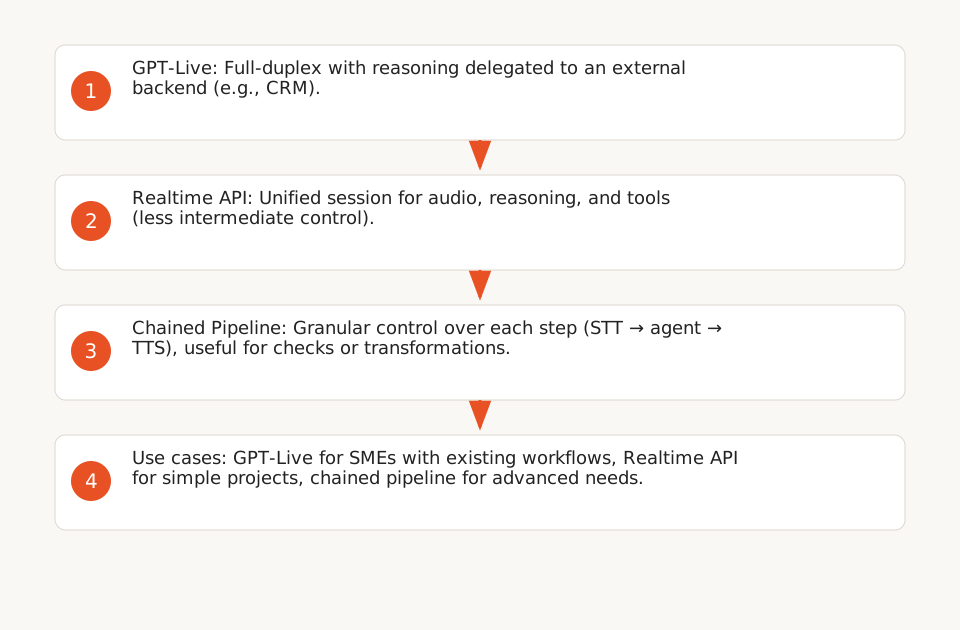
OpenAI offers three architectures for voice agents, each suited to specific control and complexity needs (F1):
- GPT-Live: Full-duplex (simultaneous listening and speaking) with reasoning delegated to an external backend. Ideal for preserving an existing text workflow (e.g., CRM, knowledge base) while adding a voice interface. The backend manages permissions and business rules, while GPT-Live focuses on conversational behavior (F2). Recommended for SMEs: this architecture allows reusing existing systems (e.g., balance checks in a CRM) without rebuilding everything.
- Realtime API: Unified session for audio, reasoning, and tools. Simplifies development by centralizing logic in a single model but offers less control over intermediate steps.
- Chained Pipeline: Granular control over each step (STT → agent → TTS). Allows inspecting or transforming text between steps, useful for adding checks (e.g., compliance policies) or calls to internal systems before responding (F3). Example code:
@function_tool
def get_weather(city: str) -> str:
    """Get the weather for a given city."""
    return f"The weather in {city} is sunny."

agent = Agent(
    name="Assistant",
    instructions="You are a helpful voice assistant.",
    model="",
    tools=[get_weather],
);Note: Use the latest OpenAI Realtime API model (see official documentation).
Useful link: Our expertise on AI agents to choose between these architectures.
2. Delegate the Backend: Where to Place Business Logic?
With GPT-Live, backend delegation is a key choice (F2):
- Client delegation: Your application executes backend work (e.g., API requests to a CRM) and returns results to GPT-Live. Provides full control over permissions and data.
- Responses delegation: Uses an OpenAI-hosted model for reasoning, but your application retains control over custom functions (e.g., payments, bookings).
In both cases, OpenAI recommends separating business rules (backend) from voice instructions (GPT-Live prompt). Example:
- Backend prompt: "Check if the customer has an active subscription before offering an appointment."
- GPT-Live prompt: "Use a professional tone and confirm actions verbally."
This separation allows updating rules without modifying the voice interface, and vice versa.
3. Optimize Speech Synthesis with ElevenLabs
ElevenLabs offers a TTS API with parameters to balance latency and quality (F6):
- Latency: Levels 0 (default) to 4 (max, with normalization disabled). Level 3 reduces latency up to ~75% of the maximum possible improvement (compared to level 0), but may affect pronunciation of numbers and dates (F8).
- Audio Continuity: Use
previous_request_idsandnext_request_ids(max 3 per request) to link multiple TTS segments and avoid cuts (F7). Example use case: generating a long audio stream for announcements or hold messages. - Audio Formats: MP3 (all tiers), WAV/PCM (Pro+), μ-law (Twilio-compatible). The μ-law format (8 kHz) is recommended for phone calls (F6). Note: Standard MP3 formats (e.g., 32 kbps) are available on all tiers. The 192 kbps MP3 format requires a Creator tier subscription (see ElevenLabs documentation).
- Normalization: ElevenLabs provides text normalization (numbers, dates) for all languages (modes
auto,on,off), and language-specific normalization (e.g., Japanese) which may increase latency (F8).
4. Integrate Telephony with Twilio
Twilio Programmable Voice enables call management via REST API or TwiML (F9):
- Outbound/Inbound Calls: Use the API to trigger calls (e.g., payment reminders) or route incoming calls to your voice agent.
- TwiML: XML language to control calls. Example to read text and enqueue:
<Response>
  <Say voice="woman">Hello, your appointment is confirmed for tomorrow at 2 PM.</Say>
  <Enqueue>queues</Enqueue>
</Response>- Advanced Features: Queues (
<Enqueue>), conferences, and recordings (parameterRecord=true) (F11).
To connect Twilio to your OpenAI/ElevenLabs agent:
- Configure a Twilio webhook to receive incoming calls.
- Transmit audio to OpenAI (STT) or ElevenLabs (TTS) via their respective APIs.
- Return the voice response to Twilio for playback to the caller.
Useful link: No-code automation with Make/Zapier for simplified integrations (without backend development).
5. Evaluate Your Voice Agent’s Quality
OpenAI recommends evaluating voice agents across 4 dimensions (F4):
- Task Outcomes: Verify that triggered actions (e.g., sending an email, booking) match the caller’s intent. Use repeatable scenarios to compare performance, as described by OpenAI (F4).
- Conversational Timing: Measure audible latency (target: < 500 ms) and interruption handling. For GPT-Live, separate backend time (e.g., API request) from frontend time (STT/TTS) (F5).
- Speech Recognition: Test with accents, background noise, and proper nouns. ElevenLabs offers multilingual models, but latency may increase for some languages.
- Session Reliability: Track connection failures, timeouts, and incomplete sessions. Twilio provides detailed logs for debugging (F9).
Evaluation methodology (F4):
- Crawl: Synthetic tests with simple requests (e.g., "What’s my balance?").
- Walk: Multi-turn scenarios (e.g., "I want to reschedule my appointment").
- Run: Real-world tests with end users.
6. Limitations and Prerequisites for SMEs
- Technical Expertise: Integrating OpenAI, ElevenLabs, and Twilio requires backend skills (Python, REST APIs). OpenAI’s code examples (F1, F3) are starting points but need adaptation for specific use cases.
- Costs: Budget for:
- OpenAI: Tokens for reasoning and tools (Realtime API model). See official pricing for current rates.
- ElevenLabs: Speech synthesis (billed per request or character). Costs depend on subscription tiers. Example: the 192 kbps MP3 format requires the Creator tier (source).
- Twilio: Outbound calls (per minute) and phone numbers (pricing).
- Compliance: Automated calls are subject to regulations (e.g., GDPR in Europe, TCPA in the U.S.). Consult a legal expert to validate your use case. Regulations vary by country.
- Audio Quality: Latency and speech recognition depend on implementation. Test with real users before large-scale deployment.
Useful link: AI implementation guide for businesses to anticipate technical and organizational challenges.
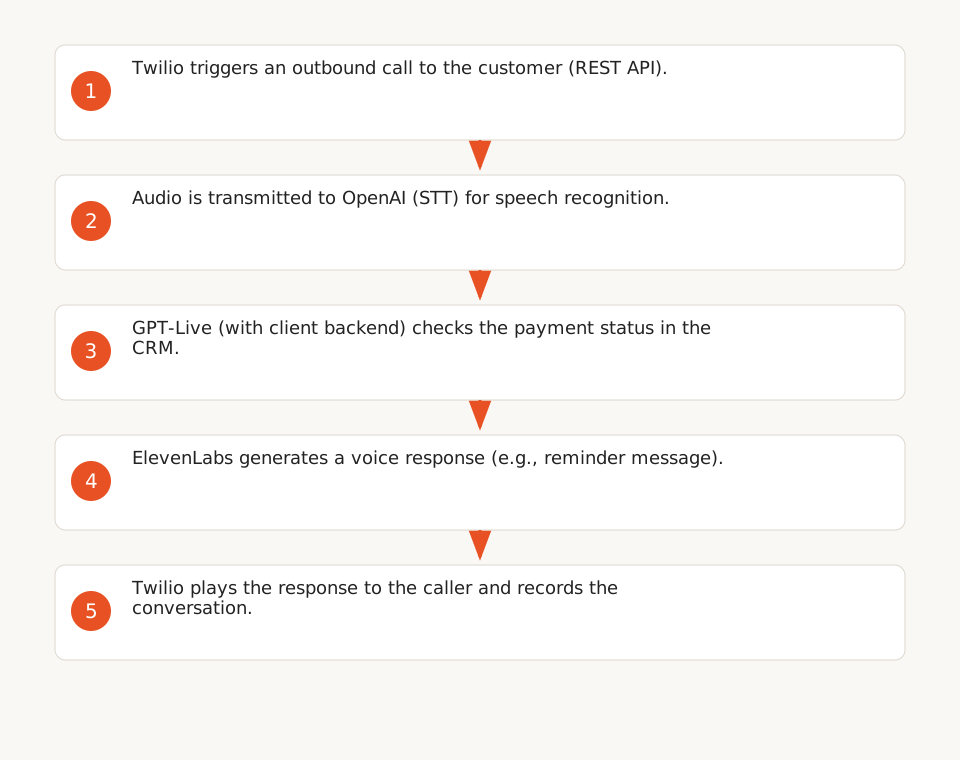
Example Workflow for a Payment Reminder
Here’s a validated technical stack to automate a reminder:
- Twilio triggers an outbound call to the customer (REST API).
- Audio is transmitted to OpenAI (STT) for recognition.
- GPT-Live (with client backend) checks the payment status in the CRM.
- ElevenLabs generates a voice response (e.g., "Your payment of €150 is overdue. Would you like to settle it now?").
- Twilio plays the response to the caller and records the conversation (parameter
Record=true).
This workflow can be adapted for other use cases (appointment scheduling, satisfaction surveys).