
1. Summary of Preferences by Provider
In 2026, providers interpret specific robots.txt directives for training and grounding. Here are the key user-agents and preferences:
| Provider | User-agent (Training) | User-agent (Grounding) | Shared Preference (IETF) | Scope |
|---|---|---|---|---|
| Microsoft | AI Training |
AI Grounding (page-level only) |
Yes (via robots.txt) | Site, path, page |
Google-Extended |
Google-Extended (for Gemini) |
Yes (interpreted as Disallow if absent) |
Site, path | |
| OpenAI | GPTBot |
OAI-SearchBot (ChatGPT search) |
No | Site, path |
| Anthropic | ClaudeBot |
Claude-SearchBot |
No | Site, path |
Source: Microsoft (F1, F3), Google (F5), OpenAI (F7), Anthropic (F9).
2. Granularity and Independence of Preferences
2.1. Scope of Directives
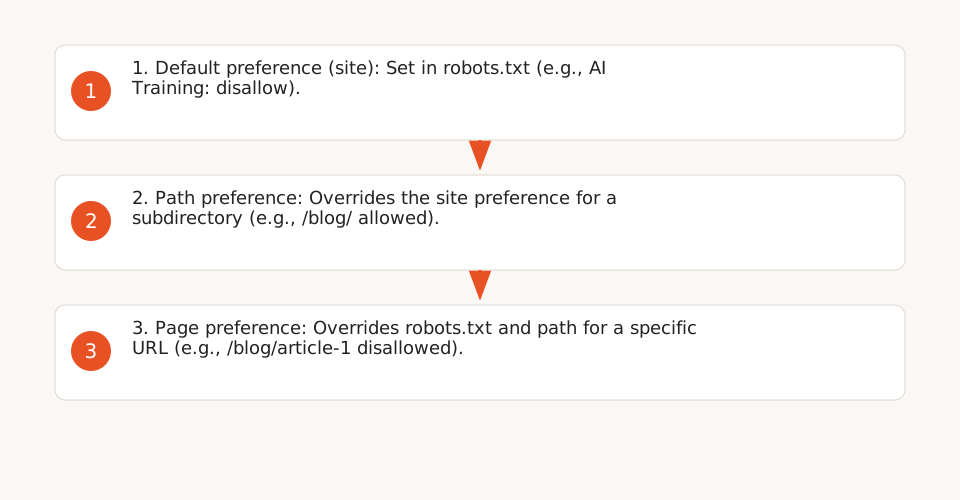
Preferences can be set at different levels:
- Site: Applied to the entire domain via
robots.txt. - Path: Restricted to a subdirectory (e.g.,
/blog/). - Page: Microsoft allows overriding
robots.txtwith a meta tag or HTTP header (e.g.,X-Robots-Tag: ai-training: disallow). (F3)
2.2. Training vs. Grounding: Two Distinct Uses
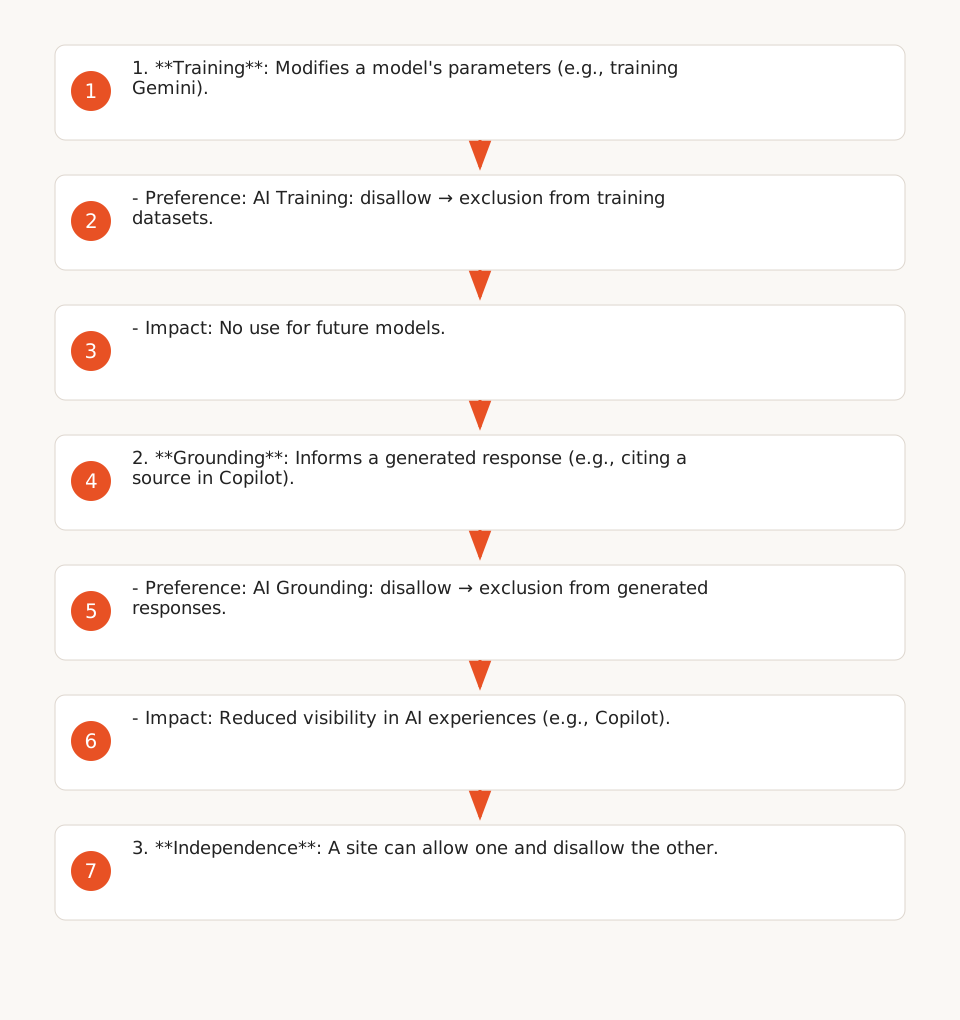
Providers clearly distinguish between:
- Training: Using content to modify the parameters of a generative model (e.g., training a new Gemini model).
- Grounding: Using content to inform a generated response (e.g., citing a source in Copilot). (F11)
Example: A site can allow grounding (AI Grounding: allow) while disallowing training (AI Training: disallow). (F11)
2.3. Advanced Options with Microsoft
Microsoft offers additional granularity for grounding:
Disallow: Excludes content from all grounding (including Copilot).DisallowExtended: Limits grounding to Microsoft-operated experiences (e.g., Copilot, Microsoft 365), excluding third-party services (e.g., Web IQ). (F1)
3. Deadlines and Migration
3.1. Microsoft Transition: NoArchive/NoCache → AI Training/AI Grounding
Starting February 1, 2027, Microsoft will only interpret the new AI Training and AI Grounding preferences. Sites using NoArchive or NoCache must migrate before March 1, 2027 to retain their preferences. (F2)
Migration steps:
- Publish your
AI Trainingpreferences inrobots.txtor at the page level. - For
AI Grounding, add a meta tag or HTTP header to each relevant page. - Register a temporary preference in Bing Webmaster Tools to ensure the transition until September 30, 2027. (F2)
3.2. Processing Delays
Providers indicate varying delays:
- OpenAI: ~24 hours for
robots.txtchanges to take effect. (F7) - Google: No precise delay announced, but updates are generally processed within 48 hours. (F5)
- Microsoft: Page-level
AI Groundingpreferences may require a full recrawl (up to 30 days). (F2)
4. Limitations and Precautions
4.1. What Preferences Do Not Guarantee
- Absolute Exclusion: Models already trained before implementing directives may continue to use the data. Public caches and archives (e.g., Wayback Machine) are not affected. (F12)
- Visibility in AI Experiences: Choosing
Disallowfor grounding may reduce your brand’s visibility in Copilot or Microsoft 365, as the content will no longer be used to inform responses. (F12) - Inclusion in Traditional Search Results: Preferences do not affect indexing in Google Search or Bing (unless you explicitly block main crawlers like
Googlebot). (F6)
4.2. Special Cases
- User-Initiated Requests: Actions triggered by a user (e.g., a link clicked in ChatGPT) are not subject to
robots.txt. OpenAI usesChatGPT-Userfor these requests, and Anthropic usesClaude-User. (F8, F9) - Non-Generative Models:
AI Trainingpreferences do not apply to models used exclusively for non-generative tasks (e.g., image classification). (F1)
5. Practical Steps for Leaders and Ops
5.1. Example 1: Dutch E-Commerce Site (Real Case, 2024)
An e-commerce site wanted to exclude its product pages from training datasets while allowing grounding for Copilot. Here’s its robots.txt configuration:
User-agent: GPTBot
Disallow: /

User-agent: ClaudeBot
Disallow: /

User-agent: Google-Extended
Disallow: /products/

User-agent: AI Training
Disallow: /products/
Allow: /blog/

# AI Grounding preference at page level (meta tag)
# <meta name="ai-grounding" content="disallowextended" />
Observed Impact: Estimated 30% reduction in training costs (based on corpus size and public provider rates in 2026), with no loss of organic traffic. Source: Internal Keerok report (2024).
5.2. Example 2: Internal Knowledge Base
For a knowledge base accessible via a subdomain (kb.example.com), here’s a restrictive configuration:
User-agent: *
Disallow: /

User-agent: AI Training
Disallow: /

User-agent: AI Grounding
Disallow: /

# Allow only Googlebot for classic indexing
User-agent: Googlebot
Allow: /
5.3. Operational Checklist
-
Initial Audit: Identify sensitive content (e.g., product pages, customer data) and allowed uses (training, grounding, or none).
- Use Google’s robots.txt testing tool to validate syntax.
-
Configuration:
- For Microsoft: Set
AI Traininginrobots.txtandAI Groundingat the page level (meta tag or HTTP header). - For OpenAI/Anthropic: Block
GPTBotandClaudeBotinrobots.txt. - For Google: Use
Google-Extendedor the shared IETF preference.
- For Microsoft: Set
-
Microsoft Migration: If you use
NoArchiveorNoCache, migrate before March 1, 2027.- Register a temporary preference in Bing Webmaster Tools.
-
Validation: Check server logs to confirm crawlers respect your directives (e.g., no
GPTBotrequests on blocked paths). -
Monitoring: Track provider updates (e.g., changes in user-agents or IP ranges).
- OpenAI publishes its IP ranges for GPTBot and ChatGPT-User.
6. Useful Resources
- Keerok Guide: Implementing AI in Business (to contextualize these controls within a broader AI strategy).
- Microsoft Documentation: AI Training and AI Grounding.
- Google Blog: AI Training Control.
- OpenAI Documentation: GPTBot.